Top 5 Emerging Web Technologies You Need to Know in 2026 — And What They Mean for Your Career
The Web Is Changing Faster Than You Think — Are You Building With Yesterday’s Tools?
The web you built on last year is already outdated — and five technologies are quietly deciding who stays relevant in 2026.
Discover the 5 emerging web technologies reshaping development in 2026 — from AI-native apps to edge computing — and learn exactly how to apply each one to your projects today.
Introduction:
Let me ask you something. When was the last time you felt genuinely surprised by a website? Not just a fancy animation — but something that felt almost alive? Something that loaded instantly, knew what you needed before you asked, and adapted to you in real time?
That experience is no longer a coincidence. It’s engineered. And behind it are five technologies that are quietly reshaping how the web is built, how content is delivered, and what users now expect as standard.
Here’s the honest truth: web development is shifting faster than most tutorials can keep up with. If you’re still building the same way you were two or three years ago, you’re not just behind — you’re building on a foundation that professionals are actively moving away from.
But this isn’t a piece meant to stress you out. It’s meant to orient you. Whether you’re a seasoned developer, a curious non-technical professional, or someone just starting to explore the web, what follows will give you a clear picture of where things are headed — and more importantly, what it all means for you.
Top 5 Emerging Web Technologies to Watch in 2026
AI-Native Development: AI Isn’t a Feature Anymore — It’s the Architecture
There’s a meaningful difference between a website that uses AI and a website built around AI. We’ve crossed that line.
In 2026, AI-native development means building applications where AI isn’t bolted on as a chatbot in the corner. It’s embedded in the core structure. It shapes the layout, generates the interface, and responds to each user differently based on their behavior.
Small language models — compact, efficient AI engines — now run directly inside browsers through a technology called WebGPU. That means AI-powered features don’t need a round-trip to a distant server every time you click. The processing happens locally, on your device. It’s faster. It’s more private. And it opens up possibilities that weren’t practical just two years ago.
What does this look like in practice? Dynamic layouts that rearrange themselves based on what a user is most likely to do next. Automated design generation that takes a wireframe and produces a production-ready page in minutes. Content that personalizes in real time, not by guessing, but by learning.
For developers working with platforms like WordPress or Next.js, this matters immediately. Frameworks like Vercel’s AI SDK have become the go-to standard for building AI-native applications, with deep integration for server-side rendering and real-time AI response streaming.
If you’ve been wondering when AI will “really” affect your work, the answer is now. The developers who understand how to build with AI at the core — not just around it — are the ones writing the job descriptions everyone else is applying to.
Server Components and Partial Hydration: Less JavaScript, Faster Everything
This one sounds technical, but stick with me — the implications are simple and significant.
For years, web apps have relied heavily on JavaScript running in the browser to make pages feel interactive. That works. But it also means users are downloading, parsing, and executing a lot of code before they see anything useful. On slow connections or older devices, that’s painful.
React Server Components flip the script. Instead of sending JavaScript to the browser and letting it build the page, the server does the heavy lifting and sends clean, ready-to-display HTML. Only the interactive parts of a page — a dropdown menu, a form, a live counter — need to “wake up” on the client side. Everything else stays lightweight.
This approach is called partial hydration, and paired with Islands Architecture, it means your browser only processes what it absolutely needs to. The result? Pages that load dramatically faster and feel more responsive, even on modest hardware.
In 2026, this isn’t experimental anymore. Meta-frameworks like Next.js and Nuxt have made this the standard starting point for professional projects. If you’re building something new today, you’re likely building with Server Components by default — whether you realize it or not.
The practical impact: sites that adopt this approach see load times that drop significantly, bounce rates improve, and SEO performance climbs. Google measures and rewards page experience. This is how you build for that.
WebAssembly: The Performance Unlock Browsers Have Been Waiting For
WebAssembly — Wasm, for short — has had a quiet few years. Quietly getting better. Quietly gaining browser support. And now, in 2026, it’s quietly becoming essential.
Here’s the core idea. Browsers have always been built to run JavaScript. But JavaScript wasn’t designed for heavy computation. It works fine for interactivity, but if you try to run real-time video editing, 3D rendering, or complex data processing in a browser using only JavaScript, things get slow.
Wasm changes that. It allows code written in languages like Rust, C, or C++ to run in the browser at near-native speed. The same performance you’d expect from a desktop application — in a web page, no installation required.
By late 2024, key Wasm features like garbage collection (WasmGC) achieved baseline support across Chrome, Firefox, and Safari. That means developers can now use it without worrying about which browser will break the experience. SIMD support — a way to process multiple data points simultaneously — is also widely available, making tasks like video processing and AI inference far more efficient.
Real-world use cases are already here. Browser-based video editors. High-performance gaming experiences. AI tools that run entirely on your device. 3D product showcases that feel like interactive art installations.
For developers building tools that require serious computation — agricultural data analyzers, logistics calculators, media production tools — Wasm is now the practical path. It’s not a curiosity. It’s the foundation of a new category of web application.
Edge Computing: Your Code, Everywhere at Once
Imagine your web application running from a server that’s always just around the corner from your user — regardless of where in the world they are. That’s edge computing, and in 2026, it’s no longer a performance trick for big tech companies. It’s a standard deployment choice.
Traditional web architecture works like this: a user in London requests data, that request travels to a data center in Virginia, and the response makes the same journey back. That round trip introduces latency. Milliseconds matter more than most people realize — especially in e-commerce, where even a 100ms delay can affect conversions.
Edge computing pushes your code and data out to hundreds of global locations. When that London user makes a request, the nearest edge node handles it. Response times drop dramatically — often by 60 to 80 percent for initial load. Sub-100ms responses, which used to require specialized infrastructure, are now achievable through standard deployment pipelines.
What’s new in 2026 is how far this has extended. Edge databases like D1 and Turso bring data storage to the edge alongside compute. This eliminates the old problem where your code was fast but your database was still far away. Edge key-value stores allow for near-instant data retrieval without traditional database roundtrips.
Frameworks like Next.js, SvelteKit, and Remix have made edge deployment a configuration setting rather than an architectural overhaul. You don’t need to redesign your app — you flip a switch, and it deploys globally.
For anyone building products that serve international audiences — whether that’s a global e-commerce brand, a publication, or a SaaS tool — edge computing is no longer optional if performance is a priority.
Headless and Composable Architectures: Build Once, Publish Everywhere
If you’ve ever maintained a website that also needed a mobile app, a digital kiosk, and a third-party API integration — all pulling from the same content — you understand exactly why headless architecture exists.
Traditional content management systems, including classic WordPress setups, couple your content directly to your front-end. Change the design, and you’re often touching the content layer too. That tightly coupled relationship creates friction as businesses grow and need their content to appear across more surfaces.
Headless CMS separates the two. Content lives in a backend system and gets served through APIs — GraphQL or JSON — to whatever front-end requests it. Your website, your app, your smart display, your voice assistant — all pull from the same source of truth. You update the content once, and it propagates everywhere.
Platforms like Contentful have evolved into full composable digital experience platforms, letting businesses assemble a tailored stack of specialized tools rather than being locked into one vendor’s ecosystem. Hygraph’s approach to content federation — pulling together multiple back-end APIs into a single GraphQL endpoint — is a compelling example of where this is heading.
GraphQL itself deserves a mention here. Unlike traditional REST APIs that return fixed data structures, GraphQL lets clients request exactly the data they need. Nothing more, nothing less. That precision reduces payload size, improves performance, and makes front-end development cleaner.
For developers using WordPress, this doesn’t mean abandoning the platform. WordPress with a headless setup — using it purely as a content back-end while building a modern React or Next.js front-end — is a legitimate, widely used architecture. You keep the editorial experience your clients know while gaining the performance and flexibility of modern front-end tools.
Bonus Mention: TypeScript Is Now the Baseline, Not the Bonus
It’s worth saying plainly: in 2026, professional web development means TypeScript. Plain JavaScript still works, but it’s increasingly seen as a legacy choice for serious projects.
TypeScript adds type safety to JavaScript — essentially, it lets you catch errors before they happen by defining what kind of data each variable should contain. The result is fewer runtime bugs, better IDE tooling, faster onboarding for new developers, and safer AI-assisted code generation.
If you haven’t made the switch yet, now is the right time to start.
Important Phrases Explained
AI-Native Development
This phrase refers to building applications where artificial intelligence is embedded in the foundational architecture rather than added as a supplementary feature. Unlike AI-integrated apps — where a chatbot or recommendation widget is layered on top of an existing codebase — AI-native development means the entire application logic is designed around AI capabilities from the start. Think of applications that generate their own UI components based on user behavior or automatically optimize workflows without human intervention.
Partial Hydration
Hydration in web development refers to the process where a server-rendered HTML page is made interactive by attaching JavaScript to it in the browser. Full hydration processes the entire page. Partial hydration, by contrast, only activates the components that actually need JavaScript interactivity — a search bar, a button, a live counter — while leaving static content as lightweight HTML. This dramatically reduces the JavaScript burden on the browser, resulting in faster load times and better performance on low-powered devices.
WebAssembly (Wasm)
WebAssembly is a binary instruction format that allows code written in languages like Rust, C, and C++ to run inside web browsers at near-native speed. It was designed to solve JavaScript’s performance ceiling for computation-heavy tasks. Rather than replacing JavaScript, Wasm complements it — handling the tasks JavaScript struggles with while JavaScript continues to manage interactivity and DOM manipulation. Its growing use in browser-based tools reflects a broader shift toward treating the browser as a full application runtime environment.
Edge Computing
Edge computing is the practice of running application code and storing data at geographically distributed server locations, called edge nodes, rather than in a centralized data center. The goal is to reduce the physical and network distance between the server and the end user, which directly lowers latency. In practical terms, a user in Tokyo and a user in Chicago both experience fast load times because the nearest edge node handles their request — rather than both routing through a single origin server in one location.
Headless CMS
A headless content management system is a back-end-only platform that stores and manages content without dictating how it’s displayed. The “head” — meaning the front-end presentation layer — is removed, and content is made available through APIs. This gives developers the freedom to build any kind of front-end experience they want while editors continue to manage content through a familiar interface. It’s widely used in organizations that need their content to appear consistently across websites, apps, and other digital channels simultaneously.
Questions Also Asked by Other People — Answered
What is the difference between edge computing and cloud computing?
Cloud computing centralizes resources — processing, storage, and services — in large data centers, typically located in a few major regions. Applications in the cloud handle requests from these fixed locations. Edge computing distributes these resources closer to end users, across hundreds of smaller locations worldwide. The main difference comes down to proximity and latency. Cloud computing is powerful and flexible for workloads that don’t require near-instant response. Edge computing is the better choice when milliseconds matter — for real-time applications, globally distributed users, and performance-critical delivery.
Is WebAssembly replacing JavaScript?
No. WebAssembly was never intended to replace JavaScript, and in 2026 it still doesn’t. The two technologies serve different roles. JavaScript excels at handling user interactions, manipulating the DOM, and gluing together application logic. WebAssembly excels at running computation-intensive tasks — image processing, physics simulations, data compression — that would be too slow in JavaScript. Most real-world Wasm applications use both: JavaScript for the application layer and Wasm for the performance-sensitive operations running underneath it.
Do I need a headless CMS if I already use WordPress?
Not necessarily — but there are compelling reasons to consider a hybrid setup. Traditional WordPress works well for content-focused websites with a single front-end. Where it shows limitations is in multi-channel publishing, high-performance requirements, and tight integration with modern JavaScript frameworks. A headless WordPress setup lets you keep the editorial workflow your team is familiar with while building a faster, more flexible front-end in React or Next.js. For projects with complex content needs or an international audience, the performance and scalability gains are often worth the additional complexity.
What are React Server Components, and why do they matter?
React Server Components are a feature that allows certain React components to render entirely on the server, producing final HTML that’s sent directly to the browser — without shipping JavaScript for those components to the client. This matters because it reduces the amount of JavaScript the browser has to download and process, which speeds up initial page loads and improves performance on slower connections. For developers, it also simplifies data fetching by allowing components to directly access databases or APIs on the server side, without the need for a separate API layer in many cases.
How does AI-native development affect small businesses and freelancers?
Significantly — and mostly in a positive way. AI-native development lowers the barrier to building sophisticated functionality. Tools like AI-powered code completion, generative UI, and agentic frameworks mean that a solo developer or small team can now build features that previously required large engineering resources. For freelancers, this means faster project delivery and the ability to offer more advanced solutions to clients. For small businesses, it means access to dynamic personalization and automation that was once only available to enterprise-scale companies. The key is learning to work with these tools intentionally rather than treating them as magic shortcuts.
Summary
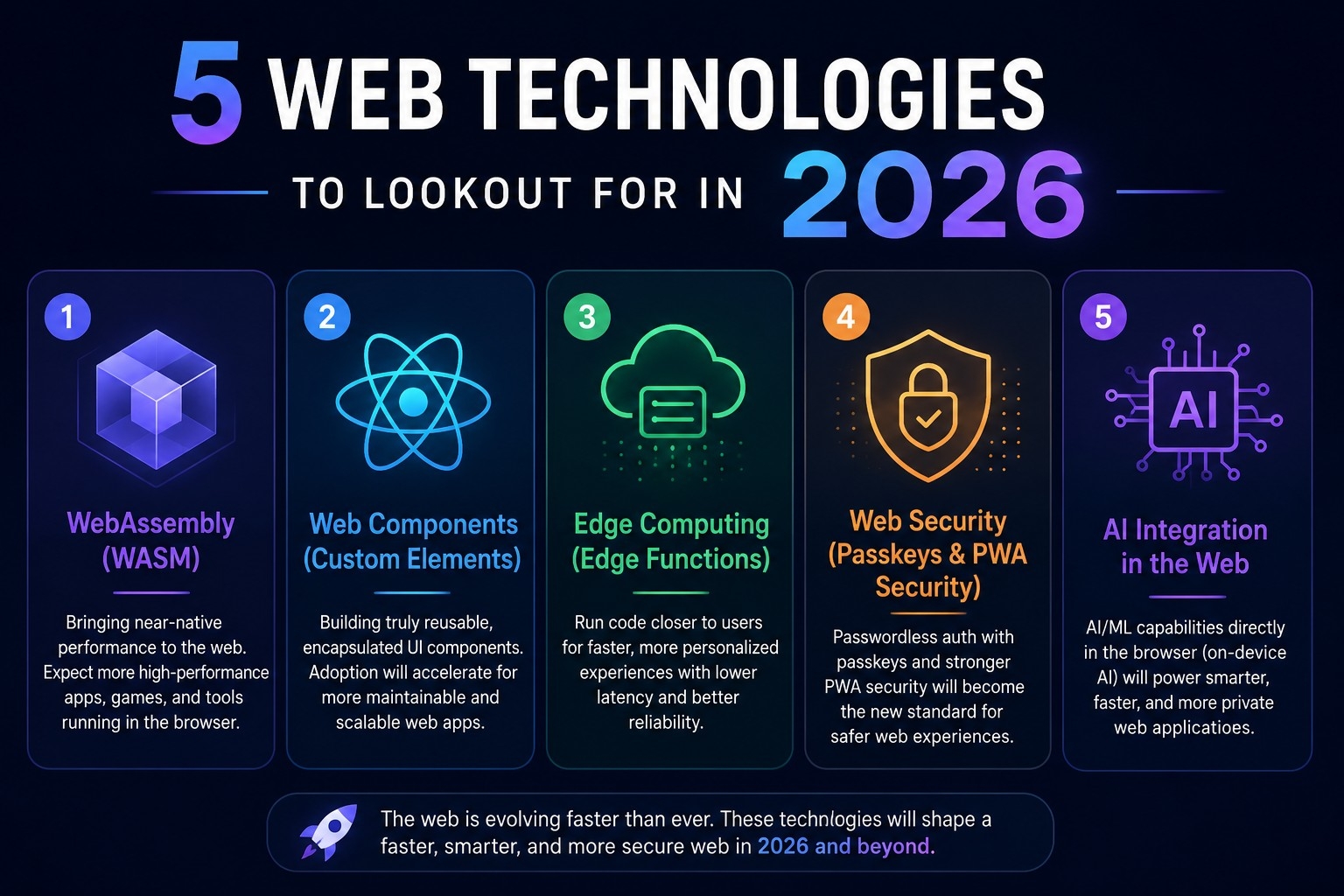
The web in 2026 isn’t the same web it was three years ago. Five technologies are driving that shift: AI-native development is moving AI from a feature to a foundation. Server Components and partial hydration are making pages faster by doing more work on the server and less in the browser. WebAssembly is unlocking near-native performance for complex applications that used to require desktop software. Edge computing is distributing code and data globally so that every user, regardless of location, gets a fast experience. And headless, composable architectures are freeing content from rigid platforms so it can flow across every screen and channel.
None of these technologies exist in isolation. They support and amplify each other. A headless CMS delivers content faster when paired with edge computing. WebAssembly performance gains make AI tools more viable in the browser. Server Components reduce JavaScript overhead, making the entire system leaner.
You don’t need to master all five at once. But being aware of where the industry is heading — and understanding what each technology actually does — puts you in a stronger position to build, advise, and grow. Start where you are. Learn one concept at a time. The web is changing, and there’s a place in that change for anyone willing to pay attention.
#WebDevelopment2026
#EmergingWebTech
#AIWebDevelopment
#EdgeComputing
#HeadlessCMS
Tags
Web Technologies 2026, AI-Native Development, WebAssembly, Edge Computing, Headless CMS
Focus Key Phrase
Emerging web technologies 2026
Suitable Slugs
top-5-emerging-web-technologies-2026
emerging-web-technologies-to-watch-2026
web-development-trends-2026
ai-native-development-edge-computing-2026
future-of-web-technology-2026