The Best Free and Paid Web Development Tools That Actually Matter in 2025
“I Tested 50+ Web Dev Tools in 2025 – Here Are the Only Ones You Really Need”
“I spent $2,847 on web dev tools last year – here’s what actually worked.”
Discover the most effective free and paid web development tools for 2025. Get practical recommendations on code editors, frameworks, testing tools, and design software that boost productivity and streamline your workflow – complete with honest pricing breakdowns.
Introduction:
Let me tell you about the day I almost quit web development.
It was 2 AM, and I’d been wrestling with a project for 14 hours straight. My code editor was sluggish, my browser kept crashing during testing, and I was manually uploading files like it was 1999. I felt like I was fighting my tools instead of building something amazing.
That breaking point taught me something crucial: the right tools don’t just make you faster – they make you love coding again.
Fast forward to 2025, and the web development arena has exploded with options. There are literally hundreds of tools claiming to reorganize your workflow for good. But here’s the thing – most of them are just noise.
After testing dozens of tools, burning through trial periods, and yes, making some expensive mistakes, I’ve learned what actually moves the needle. I’m not here to overwhelm you with every shiny new tool that launched this year. Instead, I’m sharing the ones that have genuinely transformed how I work – and how much I spend.
Whether you’re just starting out or you’re a seasoned developer looking to optimize your stack, this guide will help you cut through the marketing hype and invest in tools that actually matter.
The Game-Changing Free Tools:
Visual Studio Code – Still the Champion:
VS Code remains the undisputed king of free code editors in 2025. What makes it special isn’t just the price tag – it’s the ecosystem. The extensions marketplace has over 50,000 options, but you really only need about 10 great ones.
My must-have extensions: Prettier for code formatting, GitLens for version control insights, Live Server for instant previews, and Bracket Pair Colorizer for sanity. The built-in terminal and IntelliSense features save me countless hours every week.
The recent updates have made it even faster, with improved JavaScript and TypeScript support that feels almost magical. Auto-imports, refactoring suggestions, and error detection happen seamlessly in the background.
Git and GitHub – Your Safety Net:
If you’re not using version control, you’re playing with fire. Git is free, and GitHub offers generous free tiers that cover most developers’ needs. The peace of mind alone is worth it.
GitHub’s recent AI-powered features have been surprisingly useful. Copilot suggestions (free for students and open source contributors) can speed up repetitive coding tasks, though I still recommend understanding what it’s suggesting rather than blindly accepting everything.
The GitHub Desktop app makes branching and merging visual and intuitive, especially helpful if command line Git still feels intimidating.
Firefox Developer Edition – The Unsung Hero:
While Chrome DevTools get all the attention, Firefox Developer Edition has quietly become my go-to browser for testing. The CSS Grid Inspector is phenomenal, and the responsive design mode feels more accurate than Chrome’s equivalent.
The accessibility inspector has caught issues that other browsers missed, which has saved me from embarrassing oversights. Plus, it uses less RAM than Chrome when you have 47 tabs open (don’t judge me).
Figma – Design That Makes Sense:
Figma revolutionized how developers and designers collaborate. The free tier includes 3 Figma and 3 FigJam files, which is plenty for personal projects or small teams.
What I love most is how it bridges the gap between design and development. The inspect panel gives you exact CSS properties, and the code export feature (while not perfect) provides a solid starting point. The real-time collaboration means no more emailing design files back and forth.
The Paid Tools Worth Every Penny:
Notion – $4/month
I resisted project management tools for years, thinking they were just fancy to-do lists. Notion proved me wrong. At $4 per month for the personal pro plan, it’s replaced my note-taking app, project tracker, and documentation system.
The database features let me track bugs, feature requests, and learning resources in ways that actually make sense to my brain. The AI writing assistant (recently added) helps with documentation and brainstorming, though I still write the important stuff myself.
Netlify Pro – $19/month:
Netlify’s free tier is generous, but the Pro plan unlocks features that have transformed my deployment workflow. Form handling, split testing, and advanced analytics save me from cobbling together multiple services.
The build minutes and bandwidth limits on the free plan started feeling restrictive once I had several active projects. The $19 monthly investment pays for itself in time saved and headaches avoided.
Adobe Creative Suite – $52.99/month:
This one’s expensive, but if you do any serious design work, it’s hard to justify not having Photoshop, Illustrator, and XD. The integration between tools is seamless, and the asset libraries keep everything organized.
I tried switching to cheaper alternatives like Affinity Designer, and while they’re good, the ecosystem lock-in is real. When clients send PSD files or expect XD prototypes, having the Adobe suite just makes life easier.
That said, if budget is tight, start with the Photography plan ($9.99/month) for Photoshop and Lightroom, then upgrade later if needed.
Framework and Library Landscape:
React – The Steady Giant:
React continues to dominate the job market and open source ecosystem. React, Angular, Vue.js, Svelte, and Next.js will remain leaders in the JavaScript framework market. The learning curve is moderate, and the ecosystem is mature with solutions for almost every pr
Next.js has become the go-to framework for React applications, offering server-side rendering and static site generation out of the box. The App Router (introduced in version 13) feels more intuitive than the old Pages Router.
Vue.js – The Gentle Alternative:
Vue strikes a beautiful balance between simplicity and power. Vue.js, a progressive framework, is popular for its simplicity and integration. It suits small and big projects due to its versatility. If React feels overwhelming, Vue’s gradual adoption curve makes it perfect for adding interactivity to existing sites.
Vue 3’s Composition API brings React Hook-style logic while maintaining Vue’s template-based approach. The tooling has caught up significantly, with Vite providing blazing-fast development servers.
Svelte – The Performance Innovator:
Svelte takes a different approach – it’s a compile-time framework that generates vanilla JavaScript. Svelte’s compiler-based approach that eliminates the virtual DOM to Qwik’s focus on resumability and instant loading, each framework brings distinct strengths to the table. The resulting bundles are smaller and faster than traditional frameworks.
SvelteKit (Svelte’s full-stack framework) has matured significantly in 2025, offering file-based routing and excellent developer experience. The learning curve is gentle, making it great for developers tired of React’s complexity.
Development and Testing Tools:
Postman – API Testing Made Simple:
The free tier of Postman handles most API testing needs, but the paid plans ($12-$21/month) add team collaboration features that are invaluable for larger projects. The ability to share collections, mock servers, and automated testing has streamlined our development process.
The recent GraphQL support and improved documentation generation make it even more valuable for modern API-first development.
Chrome DevTools – Advanced Debugging:
While free, Chrome DevTools has advanced features that many developers underutilize. The Performance tab can identify bottlenecks, the Memory tab helps find leaks, and the Lighthouse audits catch accessibility and SEO issues.
The recent addition of Recorder helps create automated tests by recording user interactions, which bridges the gap between manual testing and full automation.
Cypress – End-to-End Testing:
Cypress has made end-to-end testing approachable for developers who previously avoided it. The free open-source version includes the test runner and most features you’ll need. The paid dashboard ($75-$300/month) adds test recording, parallelization, and team collaboration features.
The time-travel debugging and real-time reloading make writing tests almost enjoyable. Almost.
Design and Prototyping:
Sketch – Mac-Only Excellence:
At $9/month, Sketch remains the gold standard for UI design on Mac. The symbol system and responsive resizing features are more intuitive than Figma for complex interface work. However, the lack of real-time collaboration and Windows support limits its appeal.
The plugin ecosystem is robust, with tools for everything from accessibility checking to content generation. If you’re on Mac and working primarily solo, Sketch might edge out Figma.
Framer – Interactive Prototyping:
Framer has evolved from a prototyping tool into a full website builder with a focus on interaction design. At $20/month for the Pro plan, it’s pricier than alternatives but offers unmatched animation capabilities.
The React component system lets you create truly interactive prototypes that feel like real applications. The learning curve is steep, but the results are impressive enough to wow clients and stakeholders.
Important Phrases Explained:
Progressive Web Apps (PWAs):
Progressive Web Apps represent the convergence of web and mobile app experiences. PWAs use modern web capabilities to deliver app-like experiences directly through browsers, including offline functionality, push notifications, and device integration. They’re installed directly from browsers without app stores, making distribution simpler and updates seamless. The technology has matured significantly, with major companies like Twitter, Pinterest, and Uber successfully deploying PWAs that rival their native app counterparts in performance and user engagement.
Server-Side Rendering (SSR):
Server-Side Rendering generates HTML on the server before sending it to the browser, improving initial page load times and search engine optimization. Unlike client-side rendering where JavaScript builds the page in the browser, SSR delivers fully formed HTML immediately. This approach is particularly valuable for content-heavy sites and e-commerce platforms where SEO and performance matter. Modern frameworks like Next.js, Nuxt.js, and SvelteKit make implementing SSR straightforward, often with just configuration changes rather than architectural overhauls.
Static Site Generation (SSG):
Static Site Generation pre-builds HTML pages at build time, creating ultra-fast websites that can be served from content delivery networks worldwide. Unlike traditional static sites, modern SSG tools like Gatsby, Next.js, and Eleventy can pull data from APIs, CMSs, and other sources during build time. This approach combines the performance benefits of static sites with the flexibility of dynamic content. The result is websites that load instantly, cost less to host, and remain secure since there’s no server-side code execution.
Micro-frontends:
Micro-frontends extend the microservices concept to frontend development, allowing teams to develop, deploy, and maintain different parts of a user interface independently. Each micro-frontend can use different technologies, be developed by separate teams, and follow its own release cycle while composing into a cohesive user experience. This approach addresses the challenges of large-scale frontend development, enabling better team autonomy and technology diversity. Tools like Module Federation in Webpack 5 and Single SPA make implementing micro-frontend architectures more accessible than ever.
Jamstack Architecture:
Jamstack (JavaScript, APIs, and Markup) represents a modern architecture that decouples the frontend and backend, emphasizing pre-built markup and serverless functions. This approach leverages CDNs for global distribution, APIs for dynamic functionality, and build tools for optimization. The result is faster, more secure, and more scalable websites compared to traditional server-rendered applications. Popular Jamstack platforms include Netlify, Vercel, and AWS Amplify, which provide deployment pipelines, form handling, and serverless functions in integrated packages.
Questions Also Asked by Other People Answered:
What’s the difference between free and paid development tools?
Free development tools typically offer core functionality with limitations on features, support, or usage quotas, while paid tools provide enhanced capabilities, priority support, and collaboration features. The choice depends on your needs and team size. Many successful developers start with free tools and upgrade when they hit specific limitations or need advanced features. The key is identifying which constraints actually impact your productivity versus nice-to-have features that don’t justify the cost.
Should I learn multiple JavaScript frameworks in 2025?
Focus on mastering one framework thoroughly before exploring others, but understanding the ecosystem benefits your career long-term. React’s job market dominance makes it a safe primary choice, while Vue offers gentler learning curves and Svelte provides performance insights. The concepts transfer between frameworks more than the syntax, so deep knowledge in one framework accelerates learning others. Consider your career goals, project requirements, and team preferences when deciding your primary focus.
How do I choose between VS Code, WebStorm, and other IDEs?
VS Code excels in customization, performance, and ecosystem size, making it ideal for most developers and projects. WebStorm offers superior built-in features for JavaScript development but requires a paid license and more system resources. Consider VS Code for versatility and cost, WebStorm for advanced JavaScript features, or platform-specific IDEs like Xcode for iOS development. Your choice should align with your primary development focus, budget constraints, and performance requirements.
Are AI-powered development tools worth the investment?
AI tools like GitHub Copilot and ChatGPT can significantly accelerate routine coding tasks and provide learning assistance, but they’re supplements to fundamental programming knowledge rather than replacements. They excel at boilerplate generation, API integration examples, and debugging suggestions but struggle with complex architecture decisions and domain-specific logic. The investment is worthwhile for experienced developers who can evaluate AI suggestions critically, but beginners should focus on understanding fundamentals first.
How much should I budget for development tools annually?
A realistic annual budget ranges from $500-2000 depending on your specialization and income level. Essential paid tools might include a design subscription ($120-600), cloud hosting ($100-500), and productivity tools ($100-300). Factor in one-time purchases like premium themes or specialized software, and trial periods for evaluating expensive tools. Start with free alternatives and upgrade strategically when limitations impact your productivity or income potential rather than purchasing everything upfront.
Summary:
The web development tool landscape in 2025 offers unprecedented opportunities to build amazing digital experiences efficiently. The key isn’t having every tool available, but choosing the right combination for your specific needs and budget.
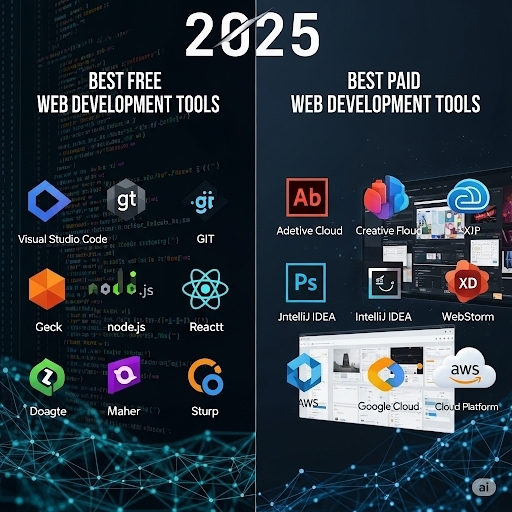
Start with the free powerhouses: VS Code, Git/GitHub, Firefox Developer Edition, and Figma’s free tier provide a solid foundation for most development work. These tools alone can handle the majority of web development tasks without spending a dime.
When you’re ready to invest, prioritize tools that solve your biggest pain points. Notion transforms project organization, Netlify Pro simplifies deployment, and framework-specific tools like Next.js or Vue CLI accelerate development in their ecosystems.
The frameworks landscape remains diverse, with React maintaining job market dominance while Vue offers approachability and Svelte pushes performance boundaries. Choose based on your projects, team, and career goals rather than following trends blindly.
Remember that tools are meant to enhance your creativity and productivity, not constrain them. The best developers adapt their toolkit as projects evolve, always balancing cutting-edge capabilities with proven reliability. Invest in learning the fundamentals deeply – tools will change, but solid development principles remain constant.
Your development toolkit should grow with your skills and ambitions. Start simple, upgrade strategically, and never let tool selection become more important than building great experiences for real users.
#WebDevelopment #WebDev #JavaScript #React #VueJS #Svelte #FrontendDevelopment #WebDesign #DeveloperTools #WebDevelopmentTools