I Ditched WordPress for a Headless CMS and Cut My Deployment Time in Half
“Most developers are building websites the hard way without even knowing it.”
“I spent three years managing content wrongly until Strapi showed me what I was missing.”
Learn why headless CMS platforms like Strapi v5 are replacing traditional systems. Real experience, practical benefits, and honest insights about modern content management for developers.
Introduction
I remember the exact moment I realized I was doing content management all wrong.
It was 2 AM on a Tuesday. I was trying to push the same blog post to our website, mobile app, and email newsletter. Copy. Paste. Reformat. Repeat. The content was identical, but I was manually adapting it for three different platforms like some kind of digital assembly line worker.
There had to be a better way out.
That frustration led me down a rabbit hole that completely changed how I think about building websites. I discovered headless CMS architectures, and specifically Strapi v5, which felt less like learning a new tool and more like someone finally handing me the right one.
If you have ever felt like your content management system is fighting against you instead of working with you, this story is for you. I am not here to sell you anything or convince you to rip out your entire tech stack tomorrow. I just want to share what I learned about a fundamentally different approach to managing content that solved real problems I was actually having.
Let me walk you through it.
The Problem I Did Not Know I Had
For years, I built websites the traditional way. WordPress, Drupal, sometimes Joomla if a client specifically requested it. The pattern was always the same: pick a CMS, build a theme, customize it until it looked right, launch it, and move on.
This worked fine until it did not.
The breaking point came when a client asked for something that should have been simple. They wanted their blog content to appear on their website, yes, but also in their iOS app, their Android app, and eventually on smart displays. Same content. Four different places.
With a traditional CMS, this is genuinely painful. Your content is wrapped up tight with your presentation layer. The blog post does not just exist as data. It exists as HTML, styled with CSS, rendered through PHP templates. Extracting that content to send it somewhere else means scraping it, parsing it, or maintaining duplicate copies.
I spent two weeks building a janky solution involving custom APIs and way too much duct tape code. It worked, but barely. And I knew that the moment they wanted to add a fifth platform, I would be right back in that mess.
That is when I started researching headless CMS options.
What Actually Is a Headless CMS
The name sounds technical, but the concept is refreshingly simple.
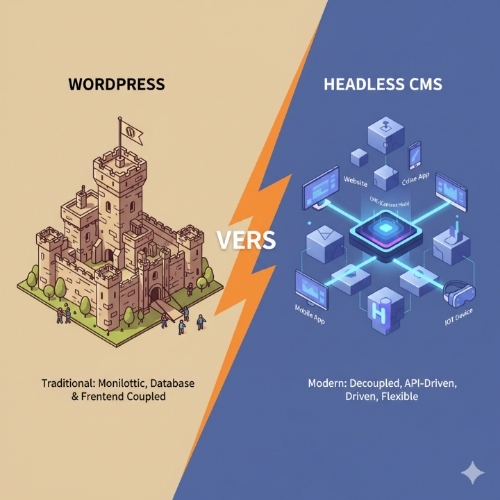
A traditional CMS has a head and a body. The body is your content and data. The head is the front-end that displays it. They are married together. You cannot easily separate them.
A headless CMS is just the body. It stores and manages your content, then makes it available through APIs. What displays that content, where it displays, how it looks, that is entirely up to you. The content system does not care.
Think about it like a restaurant kitchen versus a food truck. A traditional CMS is a full restaurant. Kitchen and dining room built together. You eat where the food is made. A headless CMS is a kitchen that delivers. The food is prepared in one place, but it can be served anywhere. Your house, a park, an office. The kitchen does not need to worry about tables and chairs.
This separation is powerful because content rarely lives in just one place anymore. Your product descriptions need to appear on your website, in your mobile app, on Amazon, maybe even in printed catalogs. Writing and maintaining that content in four different systems is ridiculous. With a headless approach, you write it once, and every platform pulls from the same source.
Why I Chose Strapi v5
Once I understood the headless concept, I had to pick an actual tool. There are plenty of options. Contentful, Sanity, Directus, and Strapi were the main contenders I looked at.
I went with Strapi for a few specific reasons.
First, it is open source. I could host it myself, which mattered for client projects where data sovereignty was a concern. Some companies just cannot put their content on third-party servers, even really good ones. With Strapi, I could spin up an instance on their own infrastructure.
Second, it is built with Node.js and uses a PostgreSQL or MySQL database. This is technology I already understood. I was not learning a proprietary system with its own quirks. If something broke or I needed to customize something, I was working with familiar tools.
Third, the API is automatic. You define your content types through an admin interface, and Strapi instantly generates a REST API and a GraphQL API for that content. You do not write API routes. You do not configure endpoints. It just works. This saved me an absurd amount of time.
And fourth, version 5 specifically added features that made it genuinely production-ready. Better performance, improved TypeScript support, enhanced security features, and a more intuitive admin interface. It felt like the team behind it had moved from building a cool prototype to building serious software.
The Migration That Changed Everything
I decided to rebuild that multi-platform client project using Strapi. This would be my test.
Setting up Strapi took maybe an hour. Install it, configure the database connection, and start it up. The admin panel opened in my browser, clean and straightforward.
Then I defined my content types. A blog post has a title, author, body, featured image, tags, and publication date. In Strapi, you just click through a visual builder. Pick field types. Set validation rules. Done. No writing database migrations. No creating admin interfaces. Strapi generated all of it.
Once my content types were defined, the API was immediately live. I could make a GET request to fetch all posts, fetch a single post by ID, create new posts, update them, delete them. All the CRUD operations just existed.
This is where things got interesting.
For the website, I built a Next.js front-end that fetched content from the Strapi API. For the mobile apps, the developers used React Native and hit the same API. Different code, same content source. When someone published a blog post through the Strapi admin panel, it appeared everywhere instantly. No duplicate work. No syncing. No copy-paste nightmares.
The client was thrilled. More importantly, I was thrilled because maintaining this system was infinitely easier than the mess I had built before.
The Real Benefits I Actually Noticed
Let me be specific about what improved.
Deployment speed got way faster. With a traditional CMS, you are deploying the whole thing. Application code, templates, database, content, all bundled together. Changes take time. With Strapi handling content separately, I could update and redeploy front-ends without touching the CMS. A design change to the website no longer required coordinating with content editors or worrying about breaking the admin panel.
Security improved almost by default. The Strapi instance sat behind authentication. Public users never touched it. They only interacted with my front-end applications, which fetched content through the API. Even if someone found a vulnerability in my website code, they could not access the admin system or database. The surface area for attacks shrank dramatically.
Flexibility became normal instead of special. Want to add a new platform? Build it and point it at the API. Want to redesign your website completely? Do it without touching your content system. Want to switch from React to Vue or Next.js to Gatsby? Go ahead. Your content does not care.
Performance got better because I could optimize each piece independently. I put my Next.js front-end behind a CDN. Cached aggressively. Generated static pages at build time. The Strapi backend only got hit when content actually changed, not on every page view.
The Learning Curve Was Not Bad
I will be honest about the adjustment period. If you are used to WordPress where you just install a theme and start typing, a headless CMS requires more technical setup. You need to build or use a separate front-end. You need to understand APIs, at least basically. You need to think about deployment differently.
But if you are already comfortable with JavaScript and have built a few web applications, the learning curve is pretty gentle. Strapi specifically tries to be approachable. The documentation is solid. The community is active. I found answers to most questions within minutes of searching.
The mental shift from thinking about a website as one monolithic thing to thinking about it as separate services takes a minute. But once it clicks, you realize how much simpler this approach actually is for complex projects.
When This Actually Makes Sense
I need to be clear about something. A headless CMS is not the right choice for every project.
If you are building a simple blog and have no technical skills, just use WordPress or Medium or Substack. The added complexity of a headless setup buys you nothing, and you will make your life harder for no reason.
But if you are in any of these situations, a headless CMS starts making real sense.
You need content on multiple platforms. Website, mobile app, digital signage, voice assistants, whatever. One content source feeding many outputs.
You want to use modern JavaScript frameworks. You love React or Vue or Svelte and do not want to fight with PHP templates.
You have a team where content editors and developers work separately. Editors update content through the CMS. Developers build experiences that consume that content. Neither group steps on the other.
You need serious performance. Static site generation, edge caching, and aggressive optimization become much easier when your content is available through an API.
You care about security. Separating your content management from your public-facing application reduces risk significantly.
For these scenarios, the headless approach stops being a trendy architecture choice and starts being the obviously correct one.
The Strapi v5 Features That Actually Matter
Let me highlight a few specific things in Strapi v5 that made a real difference for me.
The Content Manager interface got much better. Editing content feels intuitive now. Rich text editing works smoothly. Image uploads are drag-and-drop. You can preview content before publishing. This matters because content editors are the ones using this daily. If the interface is clunky, they will hate it and blame you.
Role-based access control improved significantly. You can define exactly who can do what. Some users only write drafts. Others can publish. Some can modify settings. You can map this to your actual team structure instead of forcing everyone into administrator or editor buckets.
API tokens and permissions got more granular. You can create specific tokens with limited permissions for different applications. Your website gets read-only access. Your internal dashboard gets full CRUD. Your mobile app only accesses certain content types. This level of control is important when you have multiple systems talking to your CMS.
TypeScript support became first-class. If you write your front-end in TypeScript, you can generate types based on your Strapi content models. This means type safety from your database all the way through your application. Fewer bugs. Better developer experience.
Plugin ecosystem matured. Need internationalization? There is a plugin. Need to connect to an external service? Probably a plugin for that. Want custom functionality? You can build your own. The extensibility is real.
Problems I Actually Ran Into
Nothing is perfect, so let me talk about the rough edges.
Hosting a headless CMS yourself means you are responsible for uptime, backups, security patches, and scaling. With a managed WordPress site, someone else handles that. With self-hosted Strapi, it is on you. I solved this by containerizing everything with Docker and using cloud providers with good managed services, but it added steps.
The initial setup takes longer than installing WordPress. You have to make architectural decisions upfront. Which database? Which hosting provider? How will you structure your content? How will you deploy updates? These are not hard problems, but they require thought.
Content preview can be tricky. With WordPress, you edit a post and click preview. With a headless setup, your content is in one place and your website is somewhere else. Building a preview system that works smoothly requires extra code. Strapi v5 has draft and publish features, but integrating that into your front-end workflow takes work.
If something breaks, debugging involves multiple systems. Is the problem in Strapi? Is it in your front-end? Is it a network issue? Is it the API? The distributed nature that makes headless architecture powerful also makes troubleshooting more complex sometimes.
None of these issues are dealbreakers. But they are real, and you should know about them going in.
What I Would Tell My Past Self
If I could go back and give advice to myself before starting with headless CMS architecture, here is what I would say.
Start with a real project, not a test. I learn best by solving actual problems. Pick a real website or application that would benefit from this approach and commit to building it. You will encounter real challenges and learn solutions that stick.
Do not overcomplicate it at first. My instinct was to build elaborate systems with caching layers and webhooks and automated deployments. Start simpler. Get content into Strapi. Build a basic front-end that displays it. Add complexity only when you actually need it.
Spend time designing your content model well. This is the foundation everything builds on. Think through relationships between content types. Consider how content editors will actually use the system. A good content model makes everything easier later. A bad one creates constant friction.
Learn the API thoroughly. Read the documentation. Make test requests. Understand filtering, sorting, pagination, and population. The API is your interface to everything. Knowing it well makes building front-ends dramatically faster.
Join the community. The Strapi Discord and forums are genuinely helpful. People share solutions. Answer questions. The maintainers are active and responsive. Being part of that community accelerated my learning significantly.
Where This Technology Is Heading
The momentum behind headless CMS architecture is real and growing.
More companies are adopting it because the business case is clear. You can move faster. Iterate on front-ends without disrupting content. Launch new platforms without rebuilding everything. The flexibility translates directly into competitive advantage.
The tools are maturing rapidly. Strapi v5 is substantially better than v3 was just a few years ago. The same is true across the whole category. We are past the experimental phase. These are production-ready systems powering real businesses.
Integration with modern frameworks is getting tighter. Next.js, Nuxt, SvelteKit, all the major meta-frameworks have excellent patterns for working with headless CMS platforms. The developer experience keeps improving.
AI and automation are coming into play. Imagine content suggestions, automatic translations, or intelligent tagging powered by language models, all integrated into your CMS workflow. That future is not far off.
Edge computing and serverless architecture pair beautifully with headless CMS platforms. Deploy your front-end to the edge for blazing fast performance globally. Fetch content from APIs only when it changes. The technical possibilities are expanding quickly.
My Honest Take After Two Years
I have been working with Strapi and headless CMS architecture for about two years now. It has become my default approach for any project beyond a simple brochure site.
Is it more complex than WordPress? Yes. Does it require more technical knowledge? Absolutely. But the complexity is productive complexity. You are building systems that actually match how modern content needs to work.
The initial investment in learning and setup pays dividends almost immediately. Projects that would have been painful or impossible become straightforward. Changes that would have required major refactoring become simple updates.
I do not think headless CMS is a trend that will fade. It is a fundamental rethinking of how content management should work in a multi-platform world. And that world is only getting more multi-platform.
Strapi v5 specifically has become a tool I trust. It is stable, performant, and flexible enough to handle wildly different projects. The team behind it ships updates regularly. The community is healthy. It feels like something built for the long term.
If you are building websites or applications professionally, you should understand headless CMS architecture. You do not have to use it for everything, but you should know when it is the right choice and how to implement it. This knowledge will serve you well because this is clearly where content management is going.
Important Phrases Explained
Headless CMS: A content management system where the back-end content repository is separated from the front-end presentation layer. Unlike traditional CMS platforms that tightly couple content storage with how content is displayed, a headless CMS delivers content through APIs to any front-end you choose. This allows the same content to be used across websites, mobile apps, IoT devices, and any other platform that can consume an API. The term headless refers to the absence of a predetermined front-end or head, giving developers complete freedom to build custom experiences while content editors work in a familiar interface.
API-First Architecture: An approach to software design where APIs are treated as the primary interface for accessing functionality and data, rather than an afterthought added later. In the context of content management, API-first means that every piece of content and every action is accessible through well-documented APIs from day one. This enables developers to integrate content into any application or platform using standard HTTP requests, making the CMS platform-agnostic and future-proof. API-first architecture is fundamental to headless CMS platforms and enables the flexibility that makes them valuable for multi-channel content delivery.
Content Modeling: The process of defining and structuring the types of content your system will manage, including the fields, relationships, and validation rules for each content type. In Strapi v5, content modeling happens through a visual interface where you create content types like articles, products, or events, then define what fields each type contains. Good content modeling requires thinking carefully about how content will be used, what relationships exist between different content types, and how content editors will actually work with the system. Proper content modeling upfront prevents structural problems later and makes both development and content management significantly easier.
Multi-Channel Content Delivery: The practice of distributing the same content across multiple platforms and devices from a single source. Instead of creating and maintaining separate content for your website, mobile app, smart display, and voice assistant, multi-channel delivery means writing content once and having it automatically available everywhere. Headless CMS platforms excel at this because they provide content through APIs that any platform can access, rather than locking content into a specific presentation format. This approach saves enormous time, ensures consistency across platforms, and makes adding new channels straightforward rather than requiring content duplication.
Decoupled Architecture: A software design pattern where different components of a system operate independently and communicate through defined interfaces rather than being tightly integrated. In web development, decoupled architecture typically means separating your content management system from your front-end application, allowing each to be developed, deployed, and scaled independently. This is the core concept behind headless CMS platforms like Strapi. The benefits include easier maintenance, better security through separation of concerns, ability to update one component without affecting others, and freedom to use different technologies for different parts of your system. Decoupled architecture requires more initial setup but provides significant flexibility and maintainability advantages for complex projects.
Questions Also Asked by Other People Answered
Is Strapi actually free or do you have to pay eventually: Strapi itself is completely open source and free to use forever. You can download it, install it on your own servers, and use it for commercial projects without paying anything. However, you are responsible for your own hosting, which costs money depending on where you deploy it. Strapi Cloud is the company’s paid hosting service that handles infrastructure for you, and there are also paid enterprise features for large organizations that need additional support and advanced features. For most developers and small to medium businesses, the free self-hosted version provides everything you need. The code is open source under the MIT license, which is as free and permissive as software licenses get.
Can non-technical people use Strapi to manage content: Yes, absolutely. While setting up Strapi and building the front-end applications requires developer skills, the content management interface itself is designed for non-technical users. Content editors log into a clean admin panel where they can create, edit, and publish content without touching code. The interface feels similar to WordPress or other traditional CMS platforms. You can create rich text content, upload images, manage media, and organize everything through a visual interface. The separation between developer work and content work is actually one of the major benefits. Developers set up the system and build the front-ends, then content editors can work independently without needing to know anything about APIs, databases, or code.
What happens to my content if I want to switch away from Strapi later: Since Strapi stores content in a standard database like PostgreSQL or MySQL, your data is not locked into a proprietary format. You own your content completely and can access it directly through the database. If you decided to migrate to a different CMS or build your own system, you could export your data using standard database tools or through the Strapi API itself. This is very different from closed, proprietary systems where your content is trapped in formats only that specific platform can read. The open source nature of Strapi and use of standard databases means you always have an exit path if your needs change. You are never hostage to the platform.
How does performance compare between Strapi and WordPress for high-traffic sites: For high-traffic websites, a headless CMS with a static front-end typically performs significantly better than WordPress. With WordPress, every page request hits the database, processes PHP, and renders HTML dynamically, which is resource-intensive. With Strapi providing content through an API, you can build front-ends using static site generation where pages are pre-rendered and served from a CDN. The Strapi backend only gets hit when content actually changes, not on every page view. This architecture can handle dramatically more traffic with less server resources. The trade-off is more complex initial setup. For sites getting millions of page views per month, the performance benefits of the headless approach become substantial and can translate directly into lower hosting costs and better user experience.
Does using Strapi help with SEO compared to traditional CMS options: The CMS itself does not directly determine SEO performance. What matters is the front-end application you build. However, using Strapi with modern frameworks like Next.js gives you powerful SEO advantages. You can use server-side rendering to ensure search engines see fully rendered content, generate static HTML for lightning-fast load times, control exactly how meta tags and structured data appear, and implement advanced performance optimizations that improve Core Web Vitals scores. These technical SEO factors are often easier to optimize with a headless approach than with traditional CMS platforms where you are constrained by theme limitations. The flexibility to build exactly the front-end experience you want, optimized precisely for search engines and users, is where the SEO benefits come from. Content quality still matters most, but the technical foundation is usually stronger with a well-built headless setup.
Summary
Headless CMS architectures represent a fundamental shift in how we should think about content management for modern applications. After years of working with traditional monolithic systems, discovering Strapi v5 and the headless approach solved real problems around multi-platform content delivery, deployment speed, security, and flexibility. The separation of content management from presentation layer is not just a technical curiosity but a practical solution for projects where content needs to live in more than one place. While the learning curve is steeper than installing WordPress and the initial setup requires more technical knowledge, the investment pays off through dramatically simpler maintenance and the ability to adapt quickly as requirements change. Strapi specifically stands out for being open source, built on familiar technology stacks, and production-ready with version 5. The approach is not right for every project, particularly simple blogs or sites where non-technical users need complete control, but for professional development work involving multiple platforms or modern JavaScript frameworks, headless CMS architecture has become the obviously correct choice. The momentum behind this approach is real, the tools continue maturing rapidly, and understanding these systems is increasingly essential knowledge for web developers building anything beyond basic websites.
#HeadlessCMS
#Strapi
#WebDevelopment
#ContentManagement
#APIFirst
#ModernWebDev
#JavaScript
#MultiChannelContent
#WebArchitecture
#DeveloperTools