How to Use Long-Tail Keywords for Web Development Blogs (and Actually Get More Traffic)
Unlock Hidden Traffic: Why Long-Tail Keywords Could Be the Secret in Your Web Dev Blog
Learn how to use long-tail keywords to attract niche web-development readers, boost SEO, and get high-intent traffic — with clear tips you can apply right away.
Introduction
Have you ever poured hours into writing a blog post about website development or data management… and barely anyone reads it? I have. There was a time when I thought stuffing in a few broad keywords like “web development” or “data management” would do the job. But the traffic stayed flat. Then one day I tried something different — I wrote a post around a very specific phrase. I used a long-tail keyword that matched what I knew a small group of people were Googling. The result surprised me: that post steadily climbed the search rankings and started drawing engaged readers — people who weren’t just browsing, but stayed to read and explore more of my content. That experience changed how I approach my blog strategy. In this post, I’ll show you how you can use long-tail keywords for your own web development blog — whether you’re a seasoned pro or just starting out — to attract real readers who care about the details.
Why Long-Tail Keywords Matter (More Than You Think)
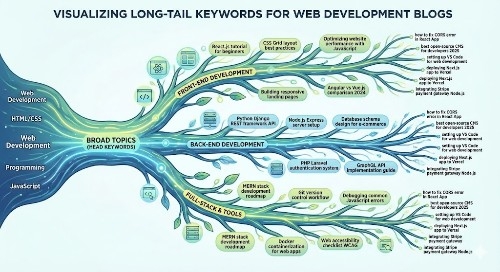
Long-tail keywords are longer, more specific search phrases — think “best lightweight CMS for small business 2025” instead of just “CMS” or “web development.” Because they’re specific, they often face less competition. That means you stand a better chance of ranking high, even if your site doesn’t yet have massive authority.
Also, people who use long-tail phrases know what they’re looking for. They’re further along in the research (or buying) journey. They’re more likely to stay on your page, read through your content, and maybe subscribe or reach out.
For a niche blog about web dev, data management, or tech tools, that means long-tail keywords let you target real, motivated readers — not just random clicks.
How I Found My First Successful Long-Tail: A Quick Story
When I ran my first modest website, I wrote a post titled “Web Development Tips” using general keywords. It got almost zero traction. Later, I watched what questions real people looked up. I saw someone searching: “how to choose web hosting for small business 2024 USA.” I decided to write an article exactly about that — with that phrase (and related variants) sprinkled naturally through the title, sub-headings, and content.
That post started ranking within weeks — and generated consistent organic traffic from US readers needing help with small business web hosting. The lesson was clear: matching real search intent with specific long-tail phrases beats generic topics almost every time.
How to Pick the Right Long-Tail Keywords for Your Web Dev Blog
Think like your reader. What exact question might they type into Google? For example: “best minimalist website builder for freelancers 2025” or “secure data storage practices for small business WordPress.”
Use search suggestions. Start typing your main topic into Google and look at autocomplete suggestions. These are real phrases actual users type.
Check “People also ask” and “Related searches” at the bottom of Google. Those often contain long-tail ideas you might miss.
Use free or affordable keyword tools (especially those with US data). Tools like Ubersuggest or Google Keyword Planner can help you validate if a phrase is searched enough to be worth targeting.
Match with your niche or offering. Since you focus on web tech, data management, and small business tools, tailor long-tails around those — e.g. “web hosting for small business USA”, “fleet management software reviews 2025”, “build data dashboard with React and PostgreSQL”.
How to Use Long-Tail Keywords in Your Posts (Without Overdoing It)
Use them in titles or sub-headings, if it reads naturally. A title like “How to Choose Web Hosting for Small Business in the US” works better than “Web Hosting Tips”.
Write content that fully answers the implied question. Don’t just drop the keyword — give practical, useful advice.
Include variants and synonyms naturally. If you target “secure data storage for small business,” also use “safe cloud storage,” “data backup,” or “data security practices” in the body.
Link internally. If you have other posts about related topics, link them. This signals authority and helps people stay on your site longer.
Update old posts when you find new long-tail ideas. Sometimes a simple tweak in title + content can give a traffic boost.
Important Phrases Explained
search for “best website builders for freelancers” — This long-tail reflects a specific user intent: a freelancer who wants a simple site. You can create a practical, how-to guide tailored to freelancers — and this specificity lets you beat bigger, generic blogs that just target “website builders.”
search for “secure data storage practices for small business USA” — This targets US small business readers who need real-world, region-specific advice about data security, compliance, or affordable storage solutions.
search for “fleet management software reviews 2025” — If you write about fleet management (given your background in car tracking), this long-tail helps reach users actively looking to compare options — and maybe buy.
search for “how to deploy React + PostgreSQL app on AWS free tier” — This is useful to developers or tech-savvy business owners looking for detailed technical guidance, making your blog a go-to resource for actionable content.
search for “best minimalist CMS for bloggers 2025” — This hits people who want lightweight, easy-to-manage websites — a common need for solo entrepreneurs or small businesses on tight budgets.
Questions Also Asked by Other People Answered
Why are long-tail keywords better than short ones?
Because long-tail keywords are more specific, they often face less competition and match what a user really wants. That means you stand a better chance of ranking high — and the people who do find your content are more likely to stay, engage, or convert.
Can long-tail SEO work for new blogs with little authority?
Yes — in fact, that’s where long-tail often shines. Since fewer websites compete for niche, specific phrases, even new or low-authority blogs can rank if they offer helpful, targeted content.
How many long-tail keywords should I target in one post?
It’s good to have a few — maybe 2 or 3 main long-tail phrases (or variants) that make sense in your title, headings, or content. Avoid stuffing too many. Focus on clarity and usefulness over trying to hit every variation.
Do long-tail keywords still work in 2025 with AI search engines and changing SEO algorithms?
Yes. As search becomes more about matching user intent (questions, detailed queries, conversational phrasing), long-tail phrases — especially those sounding like real questions — are often a better fit. They help you rank and attract readers who want answers, not clickbait.
How do I know if a long-tail keyword is worth pursuing?
Use tools (like keyword planners or tracking platforms) to check if people search for it, and look at the top results: if they are weak or generic, you may have a shot. Also — think: can you write something genuinely useful for that phrase? If yes, it’s worth a try.
Summary
Long-tail keywords are a simple but powerful tool for anyone writing about web development, data management, or tech tools. They help you zero in on real reader needs, face less competition, and attract people who actually care about what you offer. By thinking like your readers, using concrete research tools, and crafting solid content around specific phrases — not fluff — you can build a blog that grows steadily, not by luck, but by being genuinely helpful.
#SEO #LongTailKeywords #WebDevelopment #ContentMarketing #BloggingTips #WebsiteOptimization #DigitalMarketing #TechBlog #USBloggers #KeywordResearch