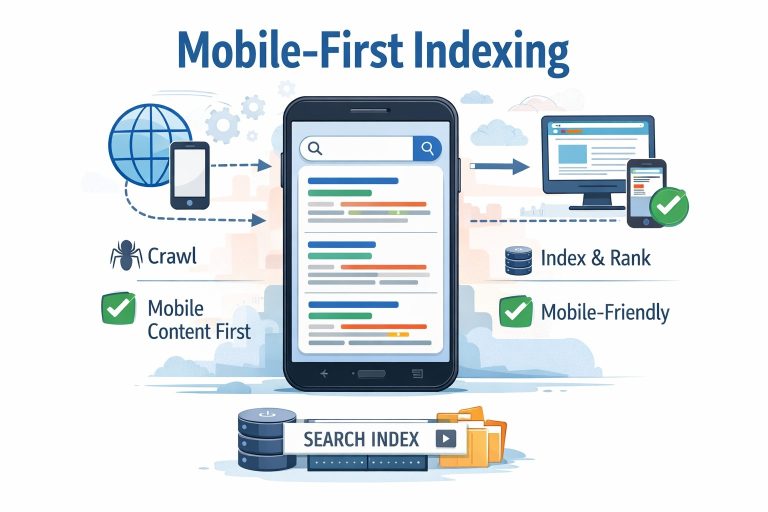
Mobile Magic: How to Make Your Website Shine on Phones
“Fast, Friendly, Functional: Optimizing Your Site for Mobile Users”
“Is your site secretly turning readers away on mobile? Let’s fix that—together.” I once lost half my readers, because my site wasn’t mobile-friendly. Here’s what saved me.”
I’ll show you simple, practical mobile-optimization techniques—like responsive layouts and mobile-first design, so your site looks great, loads fast, and keeps mobile visitors hooked.
Introduction:
Have you ever opened your own website on your phone… and winced? I get it. A few years back, I was obsessed with fancy desktop layouts, overlooking one glaring truth: most people visit sites on their phones. That realization hit me like a splash of cold water, my beautiful site was clunky to navigate, slow to load, and downright frustrating if you didn’t have a full screen. But once I fixed that, everything changed. Pages loaded faster. Engagement rose. Comments popped up. That moment taught me a simple truth: optimizing for mobile isn’t just a tech detail, it’s a lifeline to your audience. Ready to see how you can make mobile users smile from the first tap? Let’s begin.
How to Optimize Your Website for Mobile Users:
Why Care About Mobile-first Design:
Lately, mobile isn’t a “nice to have”, it’s your main stage. People check sites on phones during commutes, lunch breaks, even while waiting at the dentist’s office. If your site isn’t smooth, they’ll bail and fast. I’ve seen solid content vanish simply because people couldn’t tap a menu without zooming in.
- Start with Mobile-first Strategy:
Begin designing for the smallest screen, then scale up. It forces you to prioritize content, streamline navigation, and eliminate clutter. I used to jam everything on the homepage. When I switched to mobile-first thinking, I realized three key actions were all most phones need and a cleaner experience doubled my time-on-page.
- Use Responsive Design , Smart and Simple:
Responsive layouts automatically adjust to screen size. You don’t need separate mobile and desktop versions. CSS frameworks like Flexbox or Grid make fluid layouts easier than ever. A sidebar on desktop becomes a stacked section on mobile clean and intuitive. I once overhauled a client’s site overnight using a lightweight CSS grid and saw mobile bounce rate drop by 30%.
- Optimize Images & Media:
Large images slow everything down. I used to upload full-size photos by default. Not anymore. Now I shrink images, serve WebP or optimized JPEGs, and use “srcset” to deliver the right size for the device. Bonus: lazy-loading images only when they scroll into view keeps loading fast and smooth.
- Simplify Navigation & Tap Targets:
Tiny links are a mobile’s worst enemy. I’ve had readers tap the wrong item more times than I’d like to admit and bail. Now, I ensure buttons and menus are at least 44px tall (the recommended tappable size). I keep nav menus hidden behind clean “burger” icons and make sure form fields are finger-friendly.
- Minimize Page Load & Scripts:
Excess scripts and plugins are sneaky speed thieves. I audited my site and cut unused JavaScript and slow-loading plugins. Then I implemented caching and compressed files. The result? Pages that used to load in 4 seconds now render in under 2 and that matters. According to studies, every millisecond counts in keeping mobile readers engaged.
- Use Mobile-Friendly Fonts & Readable Text:
Tiny text forces pinching and zooming. That frustrates mobile users. I aim for at least 16px base font. Line spacing is generous, paragraphs are short, and headings are clear. Result? Mobile readers stick around because reading feels effortless not like a chore.
- Test on Real Devices:
You can’t trust emulators alone. I now rotate through testing on different screen sizes and devices (iPhone SE to Android tablets). I catch quirks you’d never see on a desktop browser. It’s the final sanity check and worth every minute.
Important Phrases Explained:
- Mobile-first Strategy:
This means designing with mobile users in mind before worrying about desktop layouts. It forces clarity. I learned that starting small keeps content focused and mobile users stick around longer.
- Responsive Design:
A way to make your layout adapt smoothly to any screen size. Rather than building separate mobile or desktop sites, one flexible template serves all users well.
- srcset Attribute:
A technique that lets your site deliver appropriately sized images to different devices. It reduces load time and keeps mobile performance snappy.
- Lazy-loading:
This delays loading non-critical content (like off-screen images) until it’s needed. It speeds up the initial page render, keeping mobile readers from hitting the back button too quickly.
- Tappable Targets:
Design elements like buttons or links sized for easy thumb interaction—at least 44px in height so people don’t miss the target or trigger the wrong link.
Questions Also Asked by Other People Answered:
- Why is mobile optimization so important anymore?
Because most people browse on phones. If your site isn’t mobile-friendly, you lose traffic fast. It’s not optional it’s standard now.
- What’s the difference between mobile-responsive and mobile-first?
Mobile-responsive adapts layout after it loads. Mobile-first means designing for mobile from the start. I prefer mobile-first because it keeps you focused on essentials.
- How do I test mobile friendless without owning dozens of phones?
Use browser dev tools and free testing platforms like BrowserStack or Google’s Mobile-Friendly Test. But also ask friends with different devices to try your site—that real feedback is gold.
- Does image compression affect quality?
You might expect blurry images, but if you shrink and compress carefully especially with newer formats like WebP you usually can’t notice a difference. Just don’t overdo it.
- Will speeding up mobile help SEO?
Absolutely. Google favors fast-loading, mobile-friendly pages in search rankings. So tuning mobile performance isn’t just user-friendly it’s SEO-smart.
Summary:
Optimizing your site for mobile is one of the smartest moves you can make. A mobile-first mindset, responsive design, compressed images, clean navigation, and fast load times transform user experience. I learned this the hard way after seeing readers drift away, mobile fixes brought them back. With just a few adjustments, you’ll make your content accessible, enjoyable, and easier to find. And that means more engagement, longer sessions, and a site that finally meets your readers where they are: on their phones.
#MobileOptimization#ResponsiveDesign#WebDevTips#MobileFirst#SiteSpeed#UserExperience#MobileUX#WebPerformance#ImageCompression#SEO