The App Gap is Closing: Why Your Next App Might Be a Website
“My app was rejected for the third time. That’s when I found a better way.
What if everything you knew about building mobile apps was wrong?”
Progressive Web Apps are transforming mobile experiences. Learn how PWAs boost performance and user engagement, cut development costs, and why major US companies are making the switch. Discover the tangible benefits for your business.
Introduction
I still remember the sinking feeling. It was my third rejection from the Apple App Store. The reason was vague, something about user interface guidelines. I’d spent months and a significant chunk of my client’s budget building a native iOS app, and a faceless reviewer had just slammed the door.
My client, a small but ambitious e-commerce startup based in Austin, Texas, was waiting. They needed a mobile presence to compete, but the app store gatekeepers were holding us up. I felt stuck. That frustration, that moment of failure, forced me to look for another way. And that’s when I truly discovered Progressive Web Apps, or PWAs.
It sounded too good to be true. A website that could act like a native app? I was skeptical. But what I learned didn’t just solve my app store problem; it changed my entire perspective on what’s possible on the web. The gap between native apps and web apps isn’t just closing, it’s becoming a strategic advantage for businesses that know how to use it.
The Turning Point: From Rejection to Revelation
After the app store rejection, I went back to the drawing board. My client needed core app-like features: push notifications for flash sales, a home screen icon for easy access, and the ability to work even with a spotty internet connection. They also needed to be found on Google. A native app buried in the app store wasn’t going to cut it.
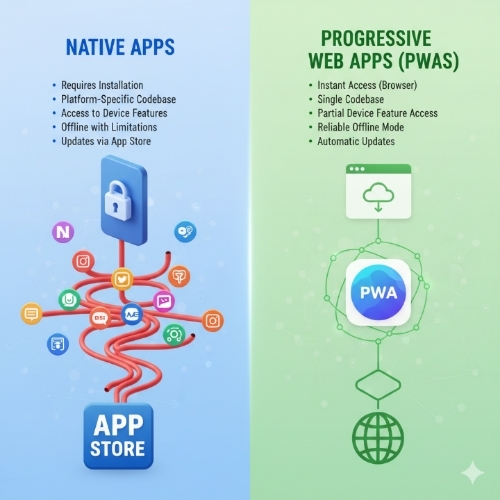
I pitched the idea of a Progressive Web App. We built it using modern web capabilities, and the result was a single codebase that worked seamlessly on iPhones, Android devices, and desktops. The launch wasn’t a submission into a store; it was simply deploying the code to our web server.
The outcome was eye-opening. The PWA loaded almost instantly, even on slower networks. Users who visited the website were prompted to “Add to Home Screen,” and they did. We sent push notifications about their abandoned carts and new arrivals, and we saw our engagement metrics soar. Best of all, we bypassed the app store entirely, along with its 30% cut of any in-app purchases. For a small business, that was a game-changer.
Why PWAs Are Winning the Engagement Game
You might be wondering how a website can compete with the polished experience of a native app. The secret is in the name: Progressive Web App. It’s a website that progressively enhances itself based on the capabilities of your user’s browser and device.
Think about the last time you downloaded an app. You probably went to the Apple App Store or Google Play, searched, hit download, waited, opened the app, and then maybe created an account. It’s a high-friction process. A PWA removes most of that friction. A user finds your site on Google, gets a prompt to install it, and with one tap, it’s on their home screen. No app store required.
This low-friction installation is a huge win for user engagement. But the real magic happens with performance and reliability. PWAs use something called a service worker, a script that runs in the background, to cache important resources. This means your site can load in milliseconds and, crucially, work offline or in areas with poor service.
Major US companies have seen incredible results. Starbucks built a PWA for their ordering system that works flawlessly offline. Customers can browse the menu, customize their order, and add items to their cart even on the subway. When they reconnect, the order goes through. This reliability builds immense trust. Similarly, Twitter Lite (their PWA) saw a 65% increase in pages per session and a 75% rise in Tweets sent, because it was fast and reliable on any network.
The Tangible Benefits for American Businesses
For businesses targeting the US market, the advantages are particularly compelling.
First, there’s the cost. Developing and maintaining separate codebases for iOS and Android is expensive and time-consuming. A PWA is a single codebase for all platforms. This is a massive efficiency gain, especially for startups and small to medium-sized businesses that need to be agile with their resources.
Second, there’s discoverability. Your app lives on the open web, not walled inside an app store. This means it can be indexed by Google and found through search, shared via a simple URL, and even show up in search results for local queries. Imagine a user in Chicago searching for “best coffee near me.” Your local cafe’s PWA can appear right in the search results, and with one tap, the user can “install” the app and place an order. That’s a powerful customer acquisition channel.
Third, you own the relationship. You don’t have to follow Apple’s or Google’s ever-changing rules or share your revenue. You control the entire user experience from start to finish.
Is a PWA Always the Right Choice?
I’ll be the first to say that PWAs aren’t a magic bullet that replaces every native app. If your app requires deep integration with the device’s hardware—think complex 3D gaming, advanced augmented reality, or constant background location tracking—a native app is still your best bet.
But for the vast majority of business applications—e-commerce, social media, news, banking, productivity tools—a PWA is not just a viable alternative; it’s often a superior one. It delivers a fast, reliable, and engaging experience while solving the biggest problems of distribution and cost.
My journey from app store rejection to PWA advocacy was born from a need to solve a real-world problem for a real client. It taught me that sometimes the biggest obstacles lead to the best solutions. The technology is here, it’s proven by industry leaders, and it’s ready to help you build a better, more accessible mobile experience for your users.
Important Phrases Explained
Service Worker: This is a core technology behind a PWA. It’s a script that your browser runs in the background, separate from a web page. Think of it as a clever proxy that can intercept network requests. It allows the PWA to cache important files and data, which is what enables the fast loading speeds and offline functionality that makes PWAs feel so much like native apps.
Web App Manifest: This is a simple JSON file that tells the browser about your web application. It contains information like the app’s name, the icons to use on the home screen, the splash screen colors, and the preferred display mode (e.g., full-screen). It’s the file that allows your website to be “installed” on a device, giving it a native app-like presence without the app store.
App Shell Model: This is a design pattern for building PWAs. The “shell” is the minimal HTML, CSS, and JavaScript required for the user interface. This shell is cached by the service worker on the first visit. On subsequent visits, the app shell loads instantly from the cache, and then dynamic content is populated. This creates a perceived performance that is incredibly fast and smooth.
Push Notifications: This is a familiar feature from native apps that PWAs have fully adopted. Through the web push API, a PWA can send timely notifications to a user’s device even when the browser is closed. This is a powerful tool for re-engaging users with updates, reminders, or promotional messages, directly driving user engagement.
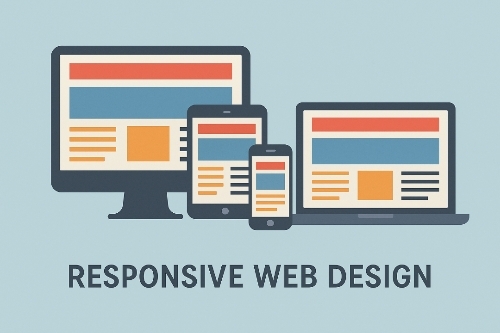
Responsive Design: While not exclusive to PWAs, it is a foundational requirement. Responsive design ensures that the web application looks and works perfectly on any screen size, from a desktop monitor to a smartphone. A PHA must provide a flawless user experience across the entire spectrum of devices to be truly “progressive.”
Questions Also Asked by Other People Answered
Can a PWA work completely offline?
Yes, this is one of their key strengths. Using the service worker to cache critical resources, a PWA can function offline or in low-network conditions. For example, a news PWA can cache the latest articles you’ve loaded, allowing you to read them on a flight. An e-commerce PWA can cache product pages and your shopping cart, so you can browse and build your cart without a connection.
Are PWAs secure?
PWAs are required to be served over HTTPS, which is the same secure protocol that protects your online banking. This ensures that all communication between the user and your server is encrypted. Furthermore, because they are built with standard web technologies and run in a secure browser sandbox, they are inherently protected from many of the risks associated with native apps that have deeper system access.
Do PWAs work on iPhones?
Yes, PWAs work on iOS through the Safari browser. Apple has added support for key PWA technologies like the service worker and web app manifest. However, it’s important to note that the level of support on iOS has historically lagged behind Android. Some features, like push notifications, are not yet available on iOS, but the core functionality of installation and offline operation works very well.
How do users “install” a PWA?
The process is beautifully simple. When a user visits your PWA with a supporting browser (like Chrome, Edge, or Safari), the browser will detect the web app manifest and often show a small prompt or icon (sometimes a “+” or “Install” prompt) in the address bar. The user simply taps “Add to Home Screen,” and the app is installed with its own icon and launch screen. There is no app store involved.
What is the difference between a website and a PWA?
Think of a PWA as a super-powered website. A regular website is a collection of pages you view in a browser. A PHA is a website that uses modern web capabilities to deliver an app-like experience. It is installable, can work offline, can send push notifications, and feels like a native application, but it is accessed initially through the web. All PWAs are websites, but not all websites are PWAs.
Summary
My frustrating experience with app store rejection led me to the powerful, practical world of Progressive Web Apps. PWAs are not a distant future technology; they are a present-day solution that closes the gap with native apps by offering superior performance, reliability, and user engagement. By leveraging a single codebase, they dramatically reduce development costs and complexity while improving discoverability on the open web. For most business applications, from e-commerce to content platforms, a PWA provides a fast, frictionless user experience that works for everyone, everywhere. The lesson was clear: sometimes the best way forward is to rethink the path entirely. For many of us, that path is a Progressive Web App.
#ProgressiveWebApp
#WebDevelopment
#MobileTech
#USTech
#SmallBusiness
#Startup
#AppDevelopment
#WebDesign
#UserExperience
#Frontend