How I Nearly Lost $5,000 to a Perfect Phishing Scam – Trust vs. Deception Online
“The Trust Equation That Saved My Business From Cybercriminals”
“91% of cyberattacks start with one simple trick you’re falling for.”
Learn how to spot phishing attacks using the trust equation. Discover proven methods to identify fake websites, build online security awareness, and protect yourself from cybercriminals targeting Americans daily.
Introduction:
Few years ago, I was rushing to meet a project deadline when I got an urgent email from “PayPal” about suspicious activity on my account. The email looked perfect – right logo, correct formatting, even a customer service number. Within two minutes, I’d clicked the link and entered my credentials on what looked exactly like PayPal’s login page.
Something felt off. Maybe it was the slightly delayed loading time, or how the URL seemed just a bit different when I looked closer. That gut feeling saved me from what could have been a $5,000 mistake.
That day taught me something crucial: in our hyperconnected world, trust has become a mathematical equation, and cybercriminals are masters at manipulating the variables. With 91% of cyber attacks beginning with a phishing email, understanding this equation isn’t just smart – it’s essential for anyone who uses the internet.
As someone who’s spent years building websites and managing data systems, I’ve seen both sides of this digital coin. I’ve watched small businesses lose everything to a single click, and I’ve helped others build fortress-like security systems. Today, I want to share what I’ve learned about the delicate balance between trust and skepticism online.
The truth is, we need trust to function in the digital world. Without it, e-commerce dies, remote work becomes impossible, and social connections crumble. But blind trust? That’s what cybercriminals count on. With phishing attacks skyrocketing by 4,151% and new AI-powered scams emerging daily, we need to get smarter about how we navigate this digital terrain.
This isn’t about becoming paranoid or disconnecting from the internet. It’s about developing what I call “intelligent trust” – a systematic approach to evaluating online interactions that keeps you safe without killing your productivity or digital relationships.
Understanding the Trust Equation vs Phishing Attacks:
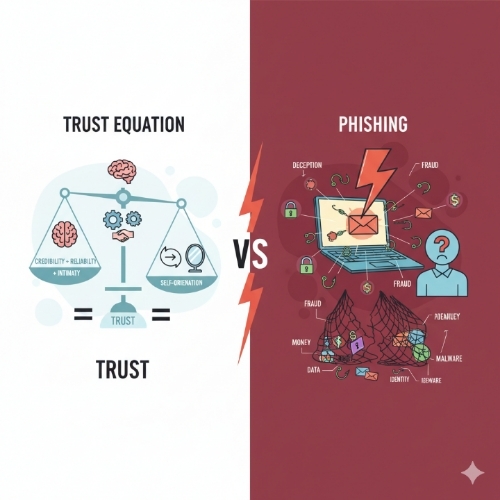
The trust equation vs phishing attacks represents one of the most critical battles happening in cyberspace today. On one side, we have our natural human tendency to trust familiar-looking communications and websites. On the other, sophisticated criminals who’ve turned deception into a science.
Think of trust as having three core components: credibility (does this look legitimate?), reliability (has this source been dependable before?), and intimacy (how comfortable do I feel sharing information?). Phishing attacks systematically exploit each of these components. They create fake websites that look identical to trusted brands, reference past interactions to seem familiar, and create urgent scenarios that bypass our rational thinking.
What makes this particularly dangerous in 2025 is how AI has revolutionized phishing techniques. Senior executives are now 23% more likely to fall victim to AI-driven, personalized attacks because these systems can craft messages that perfectly mimic writing styles, reference real business relationships, and create convincing scenarios tailored to specific individuals. The old “Nigerian prince” emails seem quaint compared to today’s sophisticated psychological manipulation.
The trust equation becomes even more complex when you consider that legitimate businesses often use the same urgency tactics as scammers. “Limited time offer,” “Account will be suspended,” “Immediate action required” – these phrases appear in both legitimate communications and phishing attempts. This overlap makes it incredibly difficult for average users to distinguish between real and fake communications without a systematic approach.
How to Identify Phishing Websites:
Learning to identify phishing websites has become a survival skill in today’s digital world. The sophistication of fake websites has reached a point where even tech-savvy individuals can be fooled by visual inspection alone. However, there are reliable methods to unmask these digital imposters before they can do damage.
Start with the URL – but don’t just glance at it. Phishing websites often use subtle variations like “paypaI.com” (with an uppercase ‘i’ instead of lowercase ‘l’) or “amaz0n.com” (with a zero instead of ‘o’). More sophisticated attacks use subdomains that look legitimate, like “paypal.secure-verification.com.” The real PayPal would never use such a format. Always check that you’re on the actual domain of the company, not a variation or subdomain designed to fool you.
SSL certificates provide another layer of verification, but they’re not foolproof. While the padlock icon and “https://” were once reliable indicators, cybercriminals now routinely obtain legitimate SSL certificates for their fake sites. However, you can click on the padlock to view certificate details. Legitimate sites from major companies will show certificates issued to the correct company name, not to individuals or unrelated organizations. If Amazon.com shows a certificate issued to “John Smith,” that’s a massive red flag.
Pay attention to website functionality and design quality. While phishing sites look increasingly sophisticated, they often have subtle flaws. Broken links, placeholder text, missing contact information, or pages that don’t work as expected can indicate a hastily constructed fake site. Legitimate businesses invest heavily in website functionality – if something feels “off” about how the site operates, trust that instinct and verify through official channels before proceeding.
Building Online Security Awareness:
Online security awareness isn’t just about knowing what threats exist – it’s about developing habits and instincts that protect you automatically. Think of it like defensive driving: experienced drivers don’t consciously think about checking blind spots or maintaining following distance, but these behaviors become second nature through practice and awareness.
The foundation of security awareness lies in understanding your own behavioral patterns and potential vulnerabilities. Most people are more susceptible to phishing when they’re stressed, rushed, or dealing with multiple tasks simultaneously. Recognizing these high-risk moments allows you to implement additional verification steps when you’re most likely to make mistakes. If you’re rushing to meet a deadline and receive an urgent security alert, that’s precisely when you should slow down and verify independently.
Phishing attacks targeting mobile devices increased by 25-40% compared to desktops, making mobile security awareness particularly crucial. Mobile interfaces make it harder to inspect URLs, certificate details, and other security indicators. Additionally, the smaller screen size and touch interface can lead to accidental clicks on malicious links. Developing mobile-specific security habits – like always checking the sender’s email address before clicking links, using official apps instead of web browsers for sensitive activities, and being extra cautious with shortened URLs – has become essential for comprehensive security awareness.
Building a security-conscious culture extends beyond individual awareness to include family members, colleagues, and team members. Security is only as strong as the weakest link, and cybercriminals often target less security-aware individuals to gain access to broader networks. Regular discussions about emerging threats, sharing experiences with suspicious communications, and creating clear protocols for handling security alerts can significantly improve overall security posture for everyone in your personal and professional networks.
Important Phrases Explained:
Spear Phishing:
Spear phishing represents the evolution of phishing from generic mass campaigns to highly targeted attacks. Unlike traditional phishing emails sent to thousands of random recipients, spear phishing involves researching specific individuals or organizations to craft personalized messages that appear to come from trusted sources. Attackers might reference recent business trips, current projects, or mutual connections to build credibility. For American businesses, spear phishing has become particularly concerning because it often targets employees with access to sensitive financial or customer data, making the potential damage significantly higher than broad-spectrum attacks.
Social Engineering:
Social engineering encompasses the psychological manipulation techniques that make phishing attacks successful. Rather than relying solely on technical vulnerabilities, social engineering exploits human psychology – our tendencies to trust authority figures, respond to urgency, and help others in apparent distress. Understanding social engineering helps explain why even technically sophisticated individuals fall victim to phishing attacks. The techniques work by bypassing rational decision-making and triggering emotional responses that lead to hasty actions, making awareness of these psychological tactics a crucial component of personal cybersecurity.
Business Email Compromise (BEC):
Business Email Compromise attacks specifically target American companies by impersonating executives or trusted business partners to authorize fraudulent wire transfers or data access. These attacks have cost U.S. businesses billions of dollars and often involve months of reconnaissance to understand company hierarchies, communication patterns, and business processes. BEC attacks succeed because they don’t require sophisticated technical knowledge – instead, they rely on understanding human behavior within organizational structures and exploiting the trust relationships that make businesses function efficiently.
Pharming:
Pharming attacks redirect users from legitimate websites to malicious ones without the user’s knowledge, often through DNS manipulation or malware that modifies local host files. Unlike phishing, which requires user action (clicking a link), pharming can affect users even when they type correct URLs directly into their browsers. This makes pharming particularly insidious because users may follow all recommended security practices yet still end up on fraudulent websites. Understanding pharming helps explain why additional verification steps, such as checking certificate details and being alert to unexpected website behavior, remain important even when accessing sites through bookmarks or direct URL entry.
Zero-Day Exploits:
Zero-day exploits target previously unknown vulnerabilities in software or systems, making them particularly dangerous because no patches or protections exist yet. While not exclusively related to phishing, zero-day exploits are increasingly integrated into phishing campaigns to maximize success rates. Cybercriminals combine social engineering with technical vulnerabilities to create multi-layered attacks that can bypass traditional security measures. For American businesses and individuals, staying protected against zero-day exploits requires maintaining updated software, using comprehensive security solutions, and implementing defense-in-depth strategies that don’t rely on any single protective measure.
Questions Also Asked by Other People Answered:
How can I tell if an email is really from my bank?
Legitimate bank emails will never ask you to click links to verify account information or update passwords. Instead, they’ll direct you to log into your account through your normal method (bookmark, typing the URL, or using their official app) and check for messages there. Real bank communications also include specific account details that only your bank would know, such as partial account numbers or recent transaction amounts. When in doubt, call your bank directly using the number from your debit card or official statements – never use phone numbers from suspicious emails.
Why do I keep getting phishing emails even with spam filters?
Modern phishing campaigns use sophisticated techniques to bypass spam filters, including constantly changing sender addresses, using legitimate email services, and crafting messages that mimic normal business communications. Additionally, your email address may be on lists sold between cybercriminals, making you a repeated target. The best defense combines strong spam filtering with personal vigilance – even advanced filters can’t catch everything, so developing the skills to recognize suspicious emails remains crucial for comprehensive protection.
Can I get malware just from opening a phishing email?
Simply opening most phishing emails won’t install malware, but clicking links or downloading attachments certainly can. However, some sophisticated attacks use techniques like invisible tracking pixels or exploit vulnerabilities in email clients to gather information or execute code without obvious user interaction. The safest approach is to delete suspicious emails without opening them, especially if they’re from unknown senders or contain unexpected attachments. Modern email clients provide preview capabilities that let you assess emails without fully opening them.
What should I do if I think I fell for a phishing scam?
Act immediately to minimize damage. First, change passwords for any accounts you may have compromised, starting with email and financial accounts. If you provided financial information, contact your banks and credit card companies to report potential fraud and consider placing fraud alerts on your credit reports. Document everything about the incident, including screenshots and email headers, as this information may be valuable for law enforcement or insurance claims. Finally, monitor your accounts closely for several months, as criminals sometimes wait before using stolen information.
Are mobile phishing attacks different from computer-based ones?
Mobile phishing attacks exploit the limitations of smartphone interfaces to make detection harder. Smaller screens make it difficult to inspect full URLs, and touch interfaces can lead to accidental clicks on malicious links. Mobile attacks also frequently use SMS (smishing) and messaging apps in addition to email. Additionally, mobile users are more likely to be distracted or multitasking, making them more susceptible to social engineering tactics. Protecting against mobile phishing requires developing mobile-specific habits, such as being extra cautious with shortened URLs and preferring official apps over web browsers for sensitive activities.
Summary:
The battle between trust and deception online represents one of the defining challenges of our digital age. As we’ve explored, the trust equation that governs our online interactions is under constant attack by increasingly sophisticated cybercriminals who understand human psychology as well as they understand technology.
The statistics paint a sobering picture: with 91% of cyberattacks beginning with phishing emails and attacks increasing by over 4,000%, this isn’t a problem that’s going away. However, understanding how to identify phishing websites through careful URL inspection, certificate verification, and behavioral analysis gives us powerful tools for protection.
Building online security awareness requires more than just knowledge – it demands developing new habits and instincts that become second nature. Whether it’s taking extra time to verify urgent requests when we’re stressed, being particularly cautious on mobile devices, or creating security protocols for our families and teams, awareness must translate into action.
The key insight from my own near-miss with phishing is that security isn’t about eliminating trust – it’s about making trust intelligent. We can maintain the connections and conveniences that make digital life worthwhile while adding verification layers that keep us safe. In a world where cybercriminals are constantly evolving their techniques, our defense must be equally dynamic and thoughtful.
Remember, every click is a trust decision. Make yours count.
#PhishingPrevention #CyberSecurity #OnlineSafety #TrustEquation #DigitalSecurity #PhishingAwareness #WebSecurity #CyberCrime #SecurityAwareness #OnlineProtection