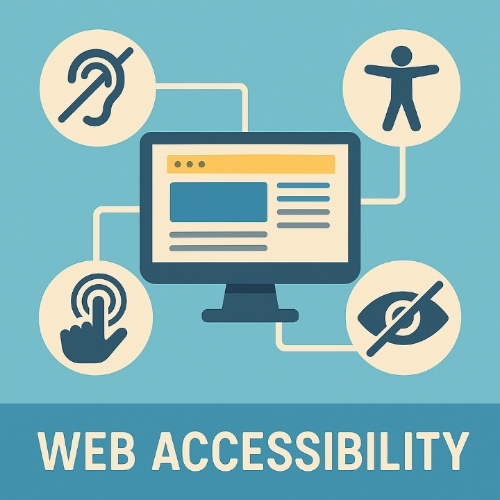
Web Accessibility: Why Your Website Might Be Losing Visitors (And How to Fix It)
Discover what web accessibility really means, why it’s crucial for your site, and how to make your website inclusive for all users. Learn key terms, common questions, and actionable fixes today.
Introduction:
Imagine clicking on a website, only to find you can’t read the text, navigate the menus, or even understand the images. Frustrating, right? For millions of people with disabilities, this is a daily struggle—one that could be fixed with simple changes. Web accessibility isn’t just a nice-to-have; it’s a must for reaching every potential visitor, avoiding legal trouble, and building a better online world. But what exactly does it take to make a website truly accessible? Let’s break it down.
What Exactly Does It Take to Make a Website Truly Accessible?
Let’s break it down!
Making a website fully accessible isn’t just about ticking boxes—it’s about designing and building with real people in mind. Here’s a breakdown of the key steps:
1. Semantic HTML: The Foundation
Screen readers and search engines rely on proper HTML structure. Use headings (`<h1>` to `<h6>`) in order, lists (`<ul>`, `<ol>`), and meaningful tags (`<nav>`, `<article>`, `<button>`) instead of generic `<div>` elements. Bad code confuses assistive tech; good code makes navigation effortless.
2. Keyboard Navigation: Beyond the Mouse
Many users (e.g., motor-impaired or blind individuals) navigate using only a keyboard. Test your site by tabbing through:
– Can you reach every interactive element (links, buttons, forms)?
– Is there a visible focus indicator (like a highlight)?
– Do pop-ups or menus trap keyboard users?
3. Alt Text & Image Descriptions:
Blind users depend on alt text (`alt=””`) for images. Write concise, meaningful descriptions (e.g., “Red apple on a wooden table,” not “image123.jpg”). Decorative images should have empty alt text (`alt=””`) to skip them.
4. Color & Contrast: Readability Matters
– Contrast ratio: Text should have at least 4.5:1 contrast against its background (use tools like WebAIM’s Contrast Checker).
– Don’t rely on color alone: “Click the red button” fails for color-blind users—add icons or labels.
5. ARIA Labels for Dynamic Content
ARIA (Accessible Rich Internet Applications) helps screen readers understand complex elements like dropdowns or live updates. Example:
html
<button aria-label=”Close modal”>X</button>
6. Video & Audio Accessibility
– Subtitles/captions for videos (not just auto-generated ones).
– Transcripts for audio content.
– Avoid autoplay (can disrupt screen readers).
7. Forms That Work for Everyone:
– Label every input field (`<label for=”email”>Email</label>`).
– Include clear error messages (e.g., “Invalid email format” vs. “Error”).
– Avoid time limits (e.g., forms that expire).
8. Avoid Accessibility Traps:
– No mouse-only hover menus (keyboard users can’t access them).
– No flashing content (can trigger seizures).
– Responsive design that works on all devices.
9. Test with Real Users & Tools:
– Automated tools (like WAVE or Lighthouse) catch ~30% of issues.
– Manual testing with screen readers (NVDA, VoiceOver).
– Involve disabled users for feedback
10. Commit to Ongoing Updates:
Accessibility isn’t a one-time fix. Audit regularly, especially after adding new features.
Addendum:
True accessibility blends technical compliance (WCAG) with empathy. It’s not just about avoiding lawsuits—it’s about ensuring no one is excluded from your content. Start small, test often, and iterate.
Need a quick win? Run your site through [WAVE](https://wave.webaim.org/) right now and fix the top 3 errors.
Important Phrases Explained:
WCAG (Web Content Accessibility Guidelines):
These are the gold standards for web accessibility, created by the W3C. They outline how to make websites usable for people with disabilities, covering everything from text readability to keyboard navigation. Following WCAG ensures your site meets legal and ethical standards.
Screen Readers:
Software that reads aloud text, buttons, and links for visually impaired users. If your site isn’t coded properly, screen readers can’t interpret it, leaving users stranded.
ARIA (Accessible Rich Internet Applications):
A set of HTML attributes that help screen readers understand dynamic content (like pop-ups or live updates). Without ARIA, complex features become useless for some visitors.
Color Contrast Ratio:
The difference in brightness between text and its background. Poor contrast makes content unreadable for people with low vision or color blindness.
Keyboard Navigation:
Many users can’t use a mouse and rely on keyboards to tab through a site. If your site isn’t keyboard-friendly, you’re locking out a huge audience.
Questions Also Asked by Other People Answered:
“Is web accessibility legally required?”
Yes, in many places. Laws like the ADA (Americans with Disabilities Act) and the EU’s Web Accessibility Directive require certain sites to meet accessibility standards. Ignoring them can lead to lawsuits.
“Does accessibility slow down my website?”
Not if done right. Properly coded accessible sites often load faster because they rely on clean, semantic HTML—which search engines love too.
“How do I test my site for accessibility?”
Use tools like WAVE or Axe, but also test manually with keyboard navigation and screen readers. Real-user testing is the gold standard.
“Can’t I just add alt text and call it done?”
Alt text is a start, but accessibility goes deeper—keyboard controls, video captions, and proper heading structures matter just as much.
“Does accessibility help SEO?”
Absolutely. Search engines prioritize accessible sites because they’re easier to crawl and understand, boosting your rankings.
Summary:
Web accessibility isn’t just about compliance—it’s about ensuring everyone, regardless of ability, can use your site. From following WCAG guidelines to optimizing for screen readers and keyboard navigation, small changes make a huge difference. Ignoring accessibility means losing visitors, facing legal risks, and missing out on SEO benefits. Start auditing your site today, and make the web a better place for all.
#WebAccessibility #InclusiveDesign #WCAG #DigitalInclusion #AccessibilityMatters #UXDesign #WebDevelopment #ADACompliance #SEO #UserExperience