10 Secrets to Skyrocket Your Website’s User Experience (UX) – Your Visitors Will Thank You!
Discover 10 powerful ways to improve your website’s UX, boost engagement, and keep visitors coming back. Learn key terms, expert answers, and actionable tips today!
Introduction
What if I told you that 88% of online consumers are less likely to return to a website after a bad experience? Your website’s user experience (UX) isn’t just about looks—it’s about emotions, ease, and efficiency. A slow, confusing, or frustrating site doesn’t just lose visitors; it kills trust. But here’s the good news: small tweaks can make a massive difference. Whether you’re a pro developer or just starting, this guide will reveal how to turn casual clicks into loyal fans. Ready to transform your site? Let’s dive in.
10 Secrets to Skyrocket Your Website’s User Experience (UX)
Your website’s user experience (UX) can make or break your online success. A smooth, intuitive, and enjoyable experience keeps visitors engaged, while a frustrating one sends them straight to your competitors. Here are 10 powerful secrets to transform your site into a UX masterpiece.
- Speed Is Non-Negotiable:
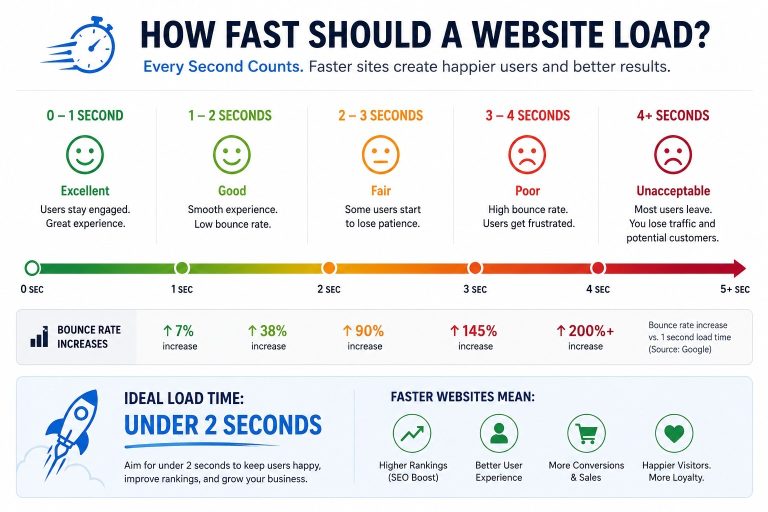
Nobody waits for a slow website. If your page takes more than 3 seconds to load, 53% of visitors will leave. Optimize images, use caching, and minimize heavy scripts to keep things lightning-fast.
- Mobile-First Design Is a Must:
Over 60% of web traffic comes from mobile devices. If your site isn’t fully responsive, you’re alienating most users. Test on multiple screen sizes to ensure smooth navigation.
- Simplify Navigation:
A confusing menu is a quick way to lose visitors. Stick to clear, logical categories – users should find what they need in three clicks or fewer.
- Use Readable Typography:
Fancy fonts may look cool, but if they’re hard to read, they hurt UX. Stick to clean, legible fonts like Arial or Roboto and keep line spacing comfortable.
- Strong CTAs Guide Users:
Weak calls-to-action like “Click Here” don’t work. Instead, use action-driven phrases like “Get Your Free Trial” or “Download Now” to boost conversions.
- Prioritize Accessibility:
Over 1 billion people live with disabilities. Ensure your site works for everyone by adding alt text, keyboard navigation, and proper color contrast.
- Reduce Clutter and Embrace White Space:
Too many elements overwhelm users. White space improves readability and helps visitors focus on what matters – your content and CTAs.
- Use Visual Hierarchy:
Guide users’ eyes with size, color, and placement. Important elements like headlines and buttons should stand out instantly.
- Test and Improve Continuously:
UX isn’t a one-time fix. Use A/B testing, heatmaps, and user feedback to refine your site over time.
- Fix Broken Links and Errors:
Nothing kills trust faster than a 404 error. Regularly scan your site for broken links and fix them fast.
Final Thought
Great UX isn’t about flashy design – it’s about making things effortless for your visitors. Implement these 10 secrets, and watch your engagement, conversions, and customer satisfaction soar. Ready to give your website the upgrade it deserves? Start today!
Important Phrases Explained:
- Responsive Design
A responsive design ensures your website adapts to any screen size—phone, tablet, or desktop. Without it, users will struggle with tiny text or misplaced buttons, leading to high bounce rates.
- Page Load Speed
Slow pages frustrate users and hurt SEO. Tools like Google PageSpeed Insights help identify delays caused by large images or bulky code.
- Intuitive Navigation
Menus should be simple and predictable. If users can’t find what they need in three clicks, they’ll leave.
- Accessibility Compliance
Websites must work for everyone, including those with disabilities. Use alt text, keyboard navigation, and proper contrast ratios.
- Call-to-Action (CTA
Strong CTAs (like “Buy Now” or “Sign Up”) guide users toward goals. Weak ones leave them confused—and unlikely to convert.
Questions Also Asked by Other People Answered
- Why does UX matter for my business?
Poor UX costs sales. A seamless experience builds trust, keeps visitors longer, and turns them into repeat customers.
- How can I test my website’s UX?
Use heatmaps, surveys, or tools like Hotjar to see where users click, scroll, or get stuck.
- What’s the biggest UX mistake?
Overloading pages with clutter. White space and clear headings help users focus.
- Does UX affect SEO?
Yes! Google ranks sites higher if they load fast, work on mobile, and keep users engaged.
- How often should I update my UX?
Test and tweak quarterly. Trends and user expectations change fast—don’t fall behind.
Summary
Improving your website’s UX isn’t just about aesthetics—it’s about psychology, speed, and simplicity. From responsive design to sharp CTAs, every detail shapes how visitors feel and act. Fix slow load times, streamline navigation, and prioritize accessibility to turn frustration into loyalty. Ready to make your site unforgettable? Start with these tips today.
#WebDesign #UserExperience #UXDesign #WebDevelopment #DigitalMarketing #SEO #WebsiteTips #TechTrends #OnlineBusiness #Accessibility