How Fast Should Your Website Load? The Truth About Speed and Google Rankings
Your Website Is Losing Visitors Every Second — Here’s What Google Never Told You About Speed
Your website could be perfect in every way — and still fail because it loads three seconds too slow.
Discover how fast your website should load, why Google ranks faster sites higher, and what you can do today to stop losing visitors and conversions to slow load times.
Introduction
I want you to picture something for a moment. You click on a link. You wait. The page just sits there, spinning. One second. Two seconds. Three. You close it and move on. Sound familiar? Of course it does. We’ve all done it. But here’s the part that catches most website owners completely off guard — your visitors are doing the exact same thing to your site. Right now. Every single day. And Google is watching.
Website speed isn’t just a technical detail you hand off to your developer and forget about. It’s one of the most underestimated factors in whether your business grows or stalls online. Slow speed kills trust, kills conversions, and — here’s the kicker — it quietly tanks your Google ranking too. So let’s talk about what the numbers actually mean, why speed matters more than most people realize, and what you can realistically do about it.
So, How Fast Should a Website Load?
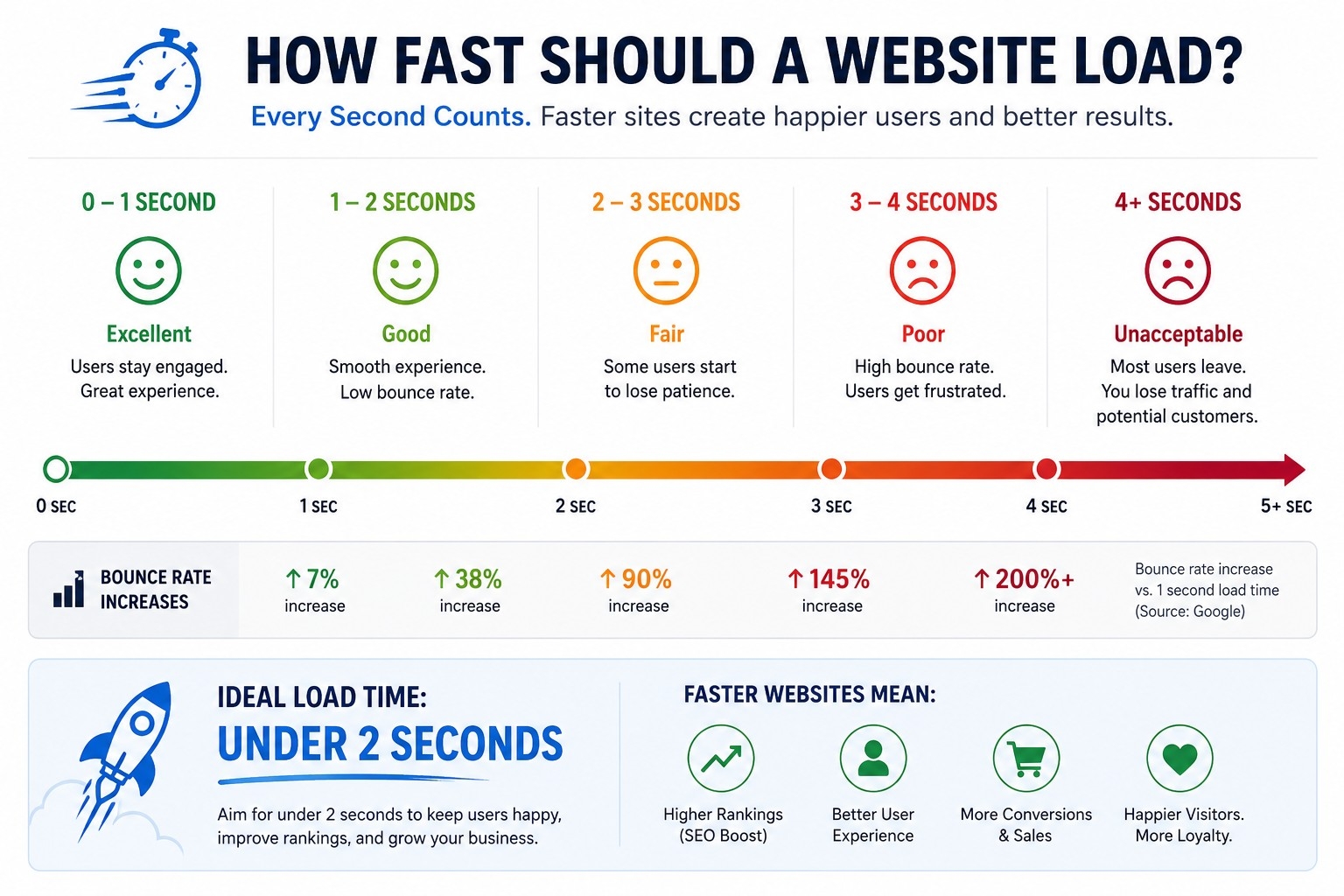
The short answer: under 2.5 seconds. That’s Google’s official benchmark from its Core Web Vitals standards. If your site loads in under two seconds, you’re in great shape. If it consistently loads between two and three seconds, you’re in acceptable territory. But once you cross that three-second mark, you’re in trouble.
Here’s a stat that genuinely surprised me the first time I read it: 53% of mobile users will abandon a page that takes more than three seconds to load. More than half. Gone. Before they’ve even seen a word of your content, your headline, your product, your offer.
And mobile isn’t some niche corner of the internet. Most people search on their phones. According to current data, average mobile page load speeds hover around 1.9 seconds, and desktop is a bit faster at around 1.7 seconds. Those are industry averages. If your site is significantly above those numbers, you’re already falling behind your competition.
The 7% Rule You Need to Know
There’s a widely referenced finding in web performance research — for every one additional second of page load time, conversions drop by roughly 7%. That might sound small. It’s not. If your site is making $10,000 a month in online revenue, a two-second delay could be costing you $14,000 a year. The BBC found something similar — they lost around 10% of their audience for every additional second it took their pages to load.
These aren’t abstract figures. They’re real money, real visitors, real lost opportunities. And most business owners have no idea it’s happening because the site “works.” It loads eventually. But eventually is not good enough anymore.
Why Google Cares So Much About Speed
Google’s entire reputation is built on one thing: giving users the best possible answer, as fast as possible. When someone clicks a Google result and immediately bounces back because the page was slow, that tells Google something. It tells Google that page didn’t deliver a good experience. Do that enough times and Google quietly starts favoring your competitors over you.
Speed became an official Google ranking factor back in 2010. Since then, it has only grown in importance. Today, Google measures page experience using something called Core Web Vitals — a set of three specific technical measurements.
The first is LCP, or Largest Contentful Paint. This measures how quickly the main content of your page actually appears on screen. Google wants this under 2.5 seconds. It’s essentially asking, “How fast does the user see something meaningful?”
The second is INP, or Interaction to Next Paint. This replaced FID (First Input Delay) as Google’s preferred metric for measuring responsiveness. It tracks how quickly a page responds when a user clicks something or types. Google’s target is under 200 milliseconds. If your page feels sluggish or unresponsive, this is usually the culprit.
The third is CLS, or Cumulative Layout Shift. This one catches people off guard. It measures how much your page jumps around visually as it loads — that annoying thing where you’re about to click a button and suddenly something loads above it and your click lands somewhere else. Google wants this score under 0.1.
Score well on all three and Google considers your site high quality. It won’t automatically rocket you to the top of page one, but it removes a real obstacle that might be holding you back.
The Behavior Signal Nobody Talks About
Here’s something that doesn’t get enough attention. Beyond the direct ranking signals from Core Web Vitals, there’s an indirect way that speed affects your ranking — through user behavior.
When visitors land on your slow site and immediately leave, that’s called a high bounce rate. When they don’t stick around long enough to explore multiple pages, your time-on-site metric drops. Both of these behavioral signals feed back into Google’s understanding of how valuable your site is.
Think of it this way. Google is constantly learning which pages people find genuinely useful. A page with incredible content but terrible speed will consistently drive people away. Google sees those exits. Over time, it interprets them as a signal that the page isn’t worth surfacing prominently.
So you can write the best article in your niche, get every keyword right, build quality backlinks — and still lose ranking ground to a competitor with a faster but slightly less polished site. It’s frustrating, but it’s real.
Mobile-First and Why It Changes Everything
Google moved to something called mobile-first indexing. What this means, practically, is that when Google evaluates your site for ranking, it’s primarily looking at the mobile version of your site — not the desktop version. Mobile is the default.
This is significant because mobile connections are often slower and less stable than desktop connections. If you’ve only ever optimized your site experience on desktop, you could be unknowingly showing Google a completely different — and much worse — version of your site.
Most local searches happen on mobile devices. If you’re a local business, a service provider, or running any kind of ecommerce operation, your mobile speed is directly connected to whether people in your area find you or your competitors first.
There’s also a lesser-known but important consideration called crawl budget. Google’s bots don’t have unlimited time to crawl every page on your site. Slow sites eat up that budget faster. The result? Fewer of your pages get indexed. That means less of your content shows up in search results. If you publish new blog posts or product pages and they’re not appearing in Google for weeks, slow server speed might be one of the reasons.
What Slows Sites Down (And What to Do About It)
Most slow websites share a handful of common problems. Uncompressed images are usually the biggest culprit. A single high-resolution photo that hasn’t been optimized can add two to three seconds to your load time on its own. Tools like Squoosh, ShortPixel, or your hosting platform’s built-in compression can fix this without sacrificing visual quality.
Bloated code is another common issue. Too many plugins, unused JavaScript files, and outdated themes all add weight to every page load. If you’re on WordPress, audit your plugins regularly. Keep what you need, delete what you don’t.
Hosting matters more than people think. Cheap shared hosting can be painfully slow. If your site is growing, moving to a managed WordPress host or a VPS with solid performance specs can make a noticeable difference almost immediately.
A content delivery network, or CDN, stores copies of your site’s files on servers around the world. When someone in Denver loads your site, they get served from a nearby server instead of wherever your host is located. Cloudflare has a free tier that works well for most small to medium sites.
Finally, enable browser caching. When someone visits your site, their browser can save certain files locally so that the next visit loads faster. This is usually a one-time setup in your hosting panel or via a plugin.
Important Phrases Explained
Website load time refers to how long it takes for a web page to fully display its content after a user clicks a link or types in a URL. It encompasses everything from server response time to how quickly images, fonts, and scripts load. A fast load time means visitors see content within one to two seconds; a slow one means they may be staring at a spinning icon for three or more seconds, which significantly increases the chance they’ll leave before seeing anything.
Core Web Vitals is a set of three performance metrics that Google uses to evaluate the user experience of web pages: LCP (Largest Contentful Paint), INP (Interaction to Next Paint), and CLS (Cumulative Layout Shift). These metrics measure how fast content loads, how responsive the page is, and how visually stable it is. Google factors these scores into its ranking algorithm as part of what it calls the “page experience” signal.
Page speed SEO refers to the relationship between how fast a website loads and how well it ranks in search engine results pages. Because Google has confirmed site speed as a ranking factor since 2010 and incorporated it more formally through Core Web Vitals, optimizing load time is now considered a standard component of technical SEO strategy for any website that wants to compete in organic search.
Mobile-first indexing is Google’s approach to ranking websites based primarily on how the mobile version of the site performs, rather than the desktop version. Since the majority of internet searches now happen on smartphones, Google shifted to this model to ensure search results reflect the experience most users actually have. Sites that load quickly and display cleanly on mobile devices are rewarded; those that don’t may see ranking penalties.
Bounce rate in the context of web performance refers to the percentage of visitors who land on a page and leave without interacting further — clicking another page, filling out a form, or making a purchase. When a page loads slowly, bounce rates spike, often dramatically. A high bounce rate is both a direct problem for conversions and an indirect signal to Google that the page may not be providing a quality user experience.
Questions Also Asked by Other People Answered
Does website speed really affect Google rankings?
Yes, it does — and Google has confirmed this publicly. Site speed became an official ranking factor in 2010, and with the introduction of Core Web Vitals as part of the page experience update, its importance has only grown. While content relevance is still Google’s top priority, speed is a meaningful tie-breaker. Two pages with comparable content and authority will not rank equally if one loads noticeably faster. The faster one typically wins, all else being equal.
What is a good page load speed for SEO?
For SEO purposes, you want your Largest Contentful Paint to come in at 2.5 seconds or under. Ideally, you’re targeting a full page load time of one to two seconds. This is the range where Google’s Core Web Vitals mark you as “good,” and where user satisfaction is highest. Anything above three seconds starts costing you visitors and potentially ranking positions, especially on mobile devices.
How do I check my website’s loading speed?
Google’s own PageSpeed Insights tool is the most direct resource — it’s free, it shows your Core Web Vitals scores, and it provides specific recommendations for what to fix. GTmetrix is another popular option that gives you a waterfall breakdown of exactly which files are slowing your page down. For ongoing monitoring, Google Search Console shows your Core Web Vitals performance over time across your entire site, not just individual pages.
Can slow website speed hurt conversions?
Absolutely. Research consistently shows that a one-second delay in page load time leads to roughly a 7% drop in conversions. For ecommerce sites, this translates directly to abandoned carts and lost sales. For service businesses, it means fewer contact form completions. The connection between speed and revenue is well-documented, and it’s one of the few performance improvements where the return on investment is both measurable and relatively immediate.
Why does my website load fast on desktop but slow on mobile?
This is more common than most people realize. Desktop computers typically have faster processors, better internet connections, and more bandwidth to handle resource-heavy pages. Mobile devices often have slower processors and are frequently on cellular connections that are less reliable than home Wi-Fi. If your site loads images and scripts at full size without optimizing for mobile, desktop users may barely notice while mobile users suffer significantly. Running your site through PageSpeed Insights on the mobile setting will show you exactly where the gaps are.
Summary
Website speed is one of those things that feels technical until you realize it’s actually about people. Every fraction of a second your page takes to load is a moment where a real visitor is deciding whether to stay or leave. Most leave faster than you’d expect.
Google’s Core Web Vitals have given us clear, measurable targets: load your main content in under 2.5 seconds, keep your page responsive with an INP under 200 milliseconds, and prevent layout shifts with a CLS score below 0.1. Hit those benchmarks and you’re giving both users and Google what they’re looking for.
The business case is simple. Slow sites lose visitors, lose conversions, and lose ranking ground to faster competitors. Faster sites keep visitors engaged, earn more trust, and show Google that the experience is worth promoting. Speed optimization isn’t a luxury for enterprise companies with big dev teams. It’s table stakes for any site that wants to grow. Start with your images, review your hosting, and run a free PageSpeed Insights audit today. The improvements you find might surprise you.
#WebsiteSpeed
#SEOTips
#CoreWebVitals
#WebDevelopment
#GoogleRanking