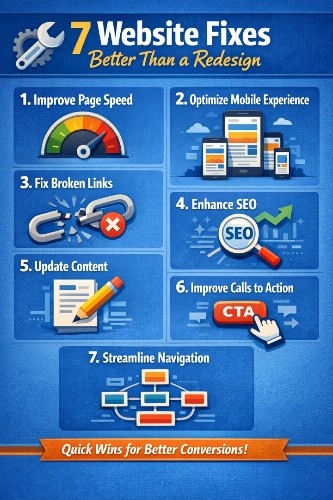
You Don’t Need a New Website — You Need These 7 Fixes
What If the Problem With Your Website Isn’t the Design?
Your website isn’t failing because it’s old — it’s failing because nobody fixed what broke.
Discover 7 proven website fixes that boost speed, conversions, and SEO — without spending thousands on a full redesign. Start seeing results in weeks.
You Don’t Need a New Website — You Need These 7 Fixes
Introduction
Let me ask you something. When was the last time you looked at your website and thought, “This thing is costing me business”?
If you’ve been nodding along, here’s the uncomfortable truth: most websites don’t fail because they’re ugly or outdated. They fail because of a handful of fixable problems that nobody ever got around to addressing. And the moment those pile up, they quietly chip away at your credibility, your traffic, and your conversions — while you’re busy running your actual business.
Here’s what surprises a lot of people: a full website redesign often costs between $3,000 and $30,000 depending on complexity. And yet, many of the businesses I’ve worked with saw 20% to 50% improvements in traffic and conversions just by fixing specific, targeted issues — without touching the core structure of their site.
So before you call a developer and blow your budget on a brand-new site, read this first. You might not need a rebuild. You might just need these seven fixes.
Fix 1: Replace Stale Images and Visuals
Images do more than decorate your page — they signal trust. A blurry stock photo from 2015 or a headshot that looks like it was taken in a parking garage tells visitors, without words, that you haven’t been paying attention.
Swap those out. Use real, recent photos — even smartphone shots work if the lighting is decent. If you’re using stock images, look for ones that feel human and relatable, not staged and sterile. Tools like Unsplash or Pexels have genuinely good free options.
On the technical side, convert your images to WebP format — it’s lighter than JPEG or PNG without losing quality. Add the loading=”lazy” attribute in your HTML so images only load when a user scrolls to them. And compress everything through a tool like TinyPNG before uploading. A single unoptimized hero image can add two or three seconds to your load time. That’s visitors you’re losing before they’ve even read your first line.
Fix 2: Rewrite Your Headlines
“Welcome to Our Website.” That’s still sitting on more homepages than anyone wants to admit. And it’s one of the quickest ways to lose someone in the first three seconds.
Your headline has one job: tell the visitor exactly what you do and why it matters to them. Not to you — to them. Flip the framing. Instead of “We offer premium digital marketing services,” try something like “Get more leads from your website — without doubling your ad budget.”
Keep it under 60 characters where possible so it displays well in search results. And update your meta title and description in your CMS to match. If you’re using WordPress, the Yoast SEO plugin makes this straightforward. A sharper headline alone can lift your click-through rate from search results by 10 to 30 percent — and that’s traffic you’re already earning but not capturing.
Fix 3: Speed Up Your Site
Here’s a number that should keep you up at night: 53% of mobile visitors abandon a website if it takes longer than three seconds to load. More than half. Gone before they’ve read a word.
Run your site through Google PageSpeed Insights right now. It’s free, and it gives you a prioritized list of what to fix. Common culprits include uncompressed images, render-blocking JavaScript, and hosting plans that are too slow for your traffic.
If you’re on WordPress, plugins like Autoptimize can minify your CSS and JavaScript files. WP Super Cache or W3 Total Cache will serve cached versions of your pages instead of rebuilding them from scratch every time someone visits. For a bigger jump, consider moving to a host that includes a CDN — SiteGround and Kinsta are both solid choices for small to mid-size businesses in the US. Target a load time under 2.5 seconds. That’s where Google’s Core Web Vitals benchmarks sit, and it’s where user satisfaction starts to climb.
Fix 4: Make Your Calls-to-Action Impossible to Miss
You’ve done the work to get someone to your site. They’re interested. And then… they leave, because they couldn’t figure out what to do next.
Calls-to-action — your buttons, your links, your “contact us” prompts — need to be specific, visible, and above the fold (meaning, visible without scrolling). Vague CTAs like “Learn More” or “Click Here” convert poorly. Specific ones like “Book a Free 20-Minute Strategy Call” or “Download the Free Checklist” convert significantly better because the visitor knows exactly what they’re getting.
Use a contrasting color for your CTA button — it should stand out from everything around it. And if you want to track what’s working, set up Google Analytics event tracking or install a tool like Hotjar to see where people are actually clicking. Adding urgency — “Only 5 spots left this month” — can also nudge fence-sitters into action, as long as it’s honest.
Fix 5: Simplify Your Navigation
Think about the last time you walked into a store with 40 different signs pointing in 40 different directions. Confusing, right? That’s what a cluttered navigation menu does to your website visitors.
Limit your main menu to five to seven items. Each item should have a clear, simple label that tells the visitor exactly where they’ll end up. Avoid clever or ambiguous labels — “Our World” is not a helpful navigation item. “About Us” is.
Build a logical hierarchy: Home, Services, About, Blog, Contact. For mobile users, make sure your hamburger menu is easy to open and that touch targets — the areas people tap — are at least 44 by 44 pixels. While you’re at it, run a quick broken link check using a tool like Screaming Frog. A 404 error midway through someone’s browsing session can kill a conversion instantly.
Fix 6: Make Sure Your Site Actually Works on Mobile
Here’s the reality: as of 2024, mobile devices account for over 60% of global web traffic. If your site looks great on a desktop and falls apart on a phone, you’re alienating the majority of your visitors.
Check your site on Google’s Mobile-Friendly Test — it’s free and takes about 30 seconds. Look for text that’s too small to read without zooming, buttons that are too close together, or images that overflow their containers. These aren’t aesthetic problems; they directly hurt your Google rankings because Google uses mobile-first indexing.
If your site was built on a modern framework like Bootstrap or Tailwind CSS, responsiveness should be baked in. But even then, it’s worth testing on actual devices — not just the browser dev tools. Borrow a friend’s Android and an iPhone if you don’t have both, and just click around. You’ll spot issues within minutes.
Fix 7: Add Security and Useful Integrations
An insecure website doesn’t just put your data at risk — it actively scares visitors away. Chrome now flags HTTP sites as “Not Secure,” and that warning in the address bar can tank your credibility instantly.
Start with an SSL certificate. If you’re on a reputable host, you can usually get one free via Let’s Encrypt and activate it in minutes. Keep your plugins and themes updated — outdated software is the most common entry point for malicious attacks on WordPress sites.
Beyond security, look at integrations that reduce friction. If clients need to book time with you, a simple Calendly embed on your contact page can eliminate several back-and-forth emails per booking. If you’re capturing leads, connecting a free HubSpot CRM takes less than an hour to set up and gives you a centralized place to manage follow-ups. Small integrations like these often have a direct, measurable impact on how many leads actually convert to clients.
Where Do You Start?
If you’re looking at this list and feeling overwhelmed, don’t be. You don’t have to do all seven fixes at once.
Run a quick audit using Google PageSpeed Insights and Google’s Mobile-Friendly Test. Score each fix on a scale of one to ten based on how much impact it’s likely to have and how easy it is to implement. Start with the high-impact, low-effort wins — often, that’s speed and mobile responsiveness. Then work through the rest over the following weeks.
If you’re on WordPress, create a child theme before making any visual changes. That way, if anything goes wrong during an update, you won’t lose your customizations. And after each fix, check your Google Analytics (GA4) to see if the metrics are moving in the right direction.
A new website can take months to plan, build, and launch. These fixes can take days. And for a lot of businesses, days matter.
Important Phrases Explained:
Website Performance Optimization: This phrase refers to the technical and design practices used to make websites load faster, run more smoothly, and deliver a better experience to users. When people search for “website performance optimization,” they’re usually dealing with slow load times, high bounce rates, or poor Core Web Vitals scores. It covers everything from image compression and caching to server response times and JavaScript minification — and it’s one of the highest-impact areas you can improve without rebuilding your site from the ground up.
Website Conversion Rate: A conversion rate is the percentage of website visitors who take a desired action — buying a product, filling out a form, booking a call. When this phrase appears in search queries, people are usually asking how to turn more of their existing traffic into actual customers. Improving CTAs, simplifying navigation, and speeding up load times are all proven levers for lifting conversion rates without increasing your advertising spend.
Website Audit Tools: Before you fix anything, you need to know what’s broken. Website audit tools like Google PageSpeed Insights, Screaming Frog, SEMrush, and Ahrefs help identify technical problems, broken links, SEO gaps, and performance bottlenecks. These tools are frequently searched by small business owners and developers who suspect their site is underperforming but aren’t sure where the problems are hiding.
Mobile-First Web Design: Google now indexes and ranks websites based primarily on their mobile versions — a practice known as mobile-first indexing. Mobile-first web design means building websites with the phone experience as the starting point, rather than scaling down from a desktop design. Searches for this topic spike whenever Google updates its algorithm, and it’s a critical concept for any business that wants to rank in search results in 2025 and beyond.
Core Web Vitals: Core Web Vitals are a set of performance metrics defined by Google that measure real-world user experience. They include Largest Contentful Paint (how fast the main content loads), Interaction to Next Paint (how responsive the page is to input), and Cumulative Layout Shift (how stable the layout is as the page loads). These metrics directly influence Google search rankings, which is why optimizing for them is a priority for any site owner concerned about SEO.
Questions Also Asked by Other People — Answered:
How do I know if my website needs a redesign or just some fixes? Start by running your site through Google PageSpeed Insights and checking your Google Analytics for metrics like bounce rate, session duration, and conversion rate. If your site’s core structure and content are still relevant but performance metrics are poor, you almost certainly need fixes, not a rebuild. A redesign makes sense when your branding has fundamentally changed, your site’s architecture no longer serves your business model, or the underlying technology is so outdated it’s creating security risks. For most small and mid-size businesses, targeted fixes will get you 80% of the results at 20% of the cost.
How much does it cost to fix a slow website? The cost depends on what’s causing the slowness. If it’s image optimization and basic caching, you can often fix it yourself using free tools like TinyPNG and a caching plugin — total cost: a few hours of your time. If your hosting plan is the bottleneck, upgrading to a better host or adding a CDN typically costs between $10 and $100 per month depending on the provider. For more complex issues like database optimization or custom code, you might hire a developer for a few hundred dollars. In almost every case, the cost of fixing a slow site is far lower than rebuilding it.
Do I need to know how to code to fix my website? Not necessarily. Most of the fixes covered in this article — updating images, rewriting headlines, improving CTAs, adjusting navigation — can be done through a CMS like WordPress without touching a single line of code. For speed fixes, plugins like Autoptimize and WP Super Cache handle most of the technical heavy lifting automatically. Where some familiarity with HTML or CSS helps is in fine-tuning button styles or fixing layout issues on mobile. But even then, there are page builders and visual editors that let you make those changes without coding.
Will these fixes actually improve my Google rankings? Yes, several of them directly influence SEO. Site speed is a confirmed ranking factor, and Google’s Core Web Vitals metrics are part of its Page Experience signals. Mobile responsiveness affects your rankings because of Google’s mobile-first indexing. Rewriting your meta titles and descriptions won’t directly change your ranking but will improve your click-through rate from search results, which indirectly signals relevance to Google. Fixing broken links improves crawlability. When applied together, these fixes create a compounding effect on organic visibility over weeks and months.
How long does it take to see results after making these fixes? It varies by fix. Speed improvements are often visible in PageSpeed Insights scores within hours of implementation. Changes to headlines and CTAs can start affecting conversion metrics within days, especially if you’re already getting meaningful traffic. SEO improvements like better meta titles or fixing broken links can take four to twelve weeks to show up in search rankings, depending on how frequently Google crawls your site. Track your changes in GA4 and set specific goals so you’re measuring the right outcomes. Patience and consistent monitoring are key.
Summary:
Rebuilding a website from scratch is expensive, time-consuming, and often unnecessary. Most underperforming websites suffer from the same recurring issues: stale visuals, vague messaging, slow load times, weak calls-to-action, cluttered navigation, poor mobile experience, and outdated security. These are all fixable — often quickly and without a large budget.
The approach is straightforward: audit first, then prioritize. Use free tools like Google PageSpeed Insights and Google’s Mobile-Friendly Test to identify where your site is losing visitors. Apply high-impact fixes first — speed, mobile responsiveness, and headline clarity tend to deliver the fastest returns. Then work through the rest methodically, tracking your results in Google Analytics as you go.
Whether you’re running a small business in the US, a professional services firm in the UK, or a startup anywhere in between, the principle is the same: targeted improvements almost always outperform full redesigns in terms of speed to results and return on investment. Fix what’s broken first. Build what’s new second.
#WebsiteOptimization #WebDevelopment #SEOTips #SmallBusinessMarketing #DigitalMarketing