Your Website Is Losing You Money Right Now — Here’s Why the Build Year Matters
What Nobody Told You When You Launched That Website in 2021 (or 2022, or 2023)
Your website might look fine — but to Google, your customers, and your competitors, it could already be invisible.
Discover why websites built before 2024 are losing traffic, rankings, and sales — and the exact steps to fix it before the gap gets any wider.
Introduction
Let me ask you something. When did you last think about the year your website was built?
Not the last time you updated a photo or swapped out some copy. I mean the actual year the whole thing was designed and developed from scratch.
If the answer is 2023, 2022, or earlier — this article is for you. Not because your website is ugly. Not because you did anything wrong. But because the web has moved, and it didn’t wait for anyone.
Here’s what’s wild: a website built in 2021 isn’t just a few years old — in web technology terms, it’s practically ancient. The tools, standards, security protocols, and performance benchmarks that your site was built against have been replaced, updated, or outright retired. And while you were busy running your business, your competitors were quietly rebuilding with tech that loads faster, ranks higher, and converts better.
This isn’t a scare story. It’s a heads-up. Think of it like this: your website is your hardest-working employee. It’s on the clock 24/7, representing you to every potential customer who finds you online. Wouldn’t you want to know if it’s been quietly underperforming this whole time?
Let’s walk through exactly what’s happening — and what you can do about it.
The Web Ages Fast. Faster Than You Think.
Most people assume a website they built three years ago is still “relatively modern.” And honestly, that’s a fair assumption — in most industries, three years isn’t that long.
But web technology doesn’t work like most industries.
The half-life of web tech is roughly 18 months. That means the frameworks, performance expectations, and security standards your site was built on in 2021 have already cycled through at least two major rounds of evolution. What was cutting-edge in 2021 is standard in 2023, and in some cases, deprecated by 2025.
Here’s a real example. React, one of the most popular tools for building modern websites, released version 18 with significant performance improvements. Then came React 19. Then came Server Components — a completely new way to build websites that reduces how much work the user’s browser has to do. Sites built before these changes were introduced aren’t just missing the features. They’re architecturally different in ways that affect speed, search rankings, and how easily a developer can improve them later.
The same goes for PHP, WordPress, content delivery, image formats, and a dozen other pieces of the puzzle. Technology doesn’t hold still, and a website that isn’t being actively updated gradually falls behind — even if it still technically works.
What “Outdated” Actually Looks Like
Here’s the part that trips people up. An outdated website doesn’t always look outdated.
You might have a sleek design, a clean layout, good brand photography — and still be running on a technology stack that’s costing you in ways you can’t see directly.
So what does outdated actually mean in practice?
Security vulnerabilities are the most urgent issue. Older websites often rely on encryption protocols like TLS 1.0 or TLS 1.1, both of which have been deprecated and replaced by TLS 1.3. They may also lack modern authentication standards and security headers that protect users from common attacks. If your site handles any customer data — contact forms, purchases, sign-ups — this matters a lot.
Performance gaps are the most visible to users. Core Web Vitals, which is Google’s framework for measuring how fast and smooth your website feels, has tightened its thresholds significantly over the past two years. Sites that weren’t built with these metrics in mind often fail them. And Google directly uses these scores as a ranking factor. Slower site, lower rank, fewer visitors. It’s pretty direct.
Mobile experience is the most overlooked. Over 60% of web traffic now comes from mobile devices. Sites built even three years ago were frequently designed with desktop-first thinking, and mobile was an afterthought. Today, that’s backwards. Google indexes the mobile version of your site first. If that experience is clunky, slow, or hard to navigate, you’re being penalized for it.
Missing modern standards is the quietest problem. Things like WCAG 2.2 accessibility compliance, GDPR and CCPA privacy features, privacy-first analytics, and structured data for search engines — these are either required by law in some jurisdictions or expected by the algorithms that decide whether your content gets found. A pre-2024 site almost certainly has gaps here.
The Business Impact Nobody Mentions
Let’s talk real numbers.
Businesses that rebuilt their websites on modern architecture have seen load times improve by around 40%, search rankings improve by roughly 60%, and in some cases, conversion rates triple. Those aren’t flukes. They’re the compounding result of faster performance, better SEO compliance, and improved user experience all working together.
What that means on the other side is this: if your competitors have rebuilt and you haven’t, they’re getting that lift. And some of that lift is coming directly from your potential customers who found them first, loaded their page faster, and didn’t bother waiting for yours.
The maintenance cost angle is also worth mentioning. Older technology stacks require more effort to maintain, are harder for developers to work with, and make it slower to ship new features or fix problems. If you’ve ever felt like your website is a constant money pit, the tech underneath is probably part of that story.
So What Should You Actually Do?
Start with an honest assessment. You don’t need to panic or immediately budget for a full rebuild. But you do need real information about where your site stands.
Check your Core Web Vitals using Google Search Console or PageSpeed Insights — it’s free and gives you a direct performance score. Review your framework versions with your developer or agency. Look at your mobile traffic in Google Analytics and compare bounce rates between mobile and desktop. Run a security scan through a tool like Sucuri or your hosting provider’s dashboard.
From there, you have two paths.
If your site is relatively recent, say 2022 to 2023, and the bones are solid, incremental modernization may be enough. Update your framework versions, patch security vulnerabilities, improve image formats, add or improve accessibility features, and optimize your Core Web Vitals. This can often be done in stages without a full rebuild.
If your site is from 2021 or earlier, or if it was never built on a modern framework to begin with, a complete rebuild is likely the more cost-effective long-term choice. Modern stacks like Next.js paired with React, edge hosting, TypeScript, and privacy-first analytics are the current standard. A well-scoped rebuild can be completed in as little as four to six weeks and will be far cheaper to maintain going forward.
Either way, the worst option is to do nothing. The gap between modern and outdated websites is widening. The longer you wait, the more ground you give up.
A Quick Word on AI Integration
One thing worth mentioning separately: AI is no longer optional on modern websites. Not in a gimmicky, chatbot-popup way — but in terms of infrastructure. Modern web platforms are increasingly built to support AI-assisted search, AI-personalized content, and intelligent features that users have begun to expect.
Sites built before 2024 weren’t designed with this in mind. They can’t easily plug into these capabilities because the underlying architecture doesn’t support it. It’s not a dealbreaker today, but it will be a meaningful gap within the next year or two.
Important Phrases Explained
Web Technology Half-Life: This phrase refers to how quickly web technologies become outdated or replaced. Just like a radioactive material that loses half its potency over a set period, web tech loses its relevance about every 18 months. The tools, languages, and frameworks that were standard practice just two years ago are often already being replaced by better-performing alternatives. For website owners, this means that a “set it and forget it” approach to web development is genuinely risky — not because your site breaks, but because the standards around it keep evolving while yours stays still.
Core Web Vitals: Core Web Vitals is Google’s set of performance metrics that measure real-world user experience on your website. They cover things like how fast the largest piece of content loads (Largest Contentful Paint), how quickly the page responds to a user’s first interaction (Interaction to Next Paint), and how much the layout shifts around as the page loads (Cumulative Layout Shift). Google uses these scores as a direct ranking factor, meaning a site with poor Core Web Vitals is actively penalized in search results. Sites built before 2024 often fail these metrics simply because they weren’t designed with them in mind.
Server-Side Rendering vs. Client-Side Rendering: These terms describe how a website builds the page a user sees. Client-side rendering means the user’s browser does most of the heavy lifting — downloading a mostly blank page and then using JavaScript to build the content. It’s more flexible but often slower, especially on mobile or slower connections. Server-side rendering means the server prepares the full page before sending it to the browser, which is generally faster for the user and better for SEO. Modern approaches like Server Components take this even further, allowing developers to keep sensitive logic on the server while still delivering a fast, interactive experience.
TLS (Transport Layer Security): TLS is the security protocol that encrypts communication between a user’s browser and a web server — it’s what puts the “S” in HTTPS. Older versions like TLS 1.0 and 1.1 have known vulnerabilities and have been officially deprecated by major browsers and standards bodies. Modern websites should be running TLS 1.3, which is faster and significantly more secure. If your website was built several years ago and hasn’t been actively maintained, there’s a real chance it’s still running on an outdated version — which creates both a security risk for your users and a trust signal problem with browsers.
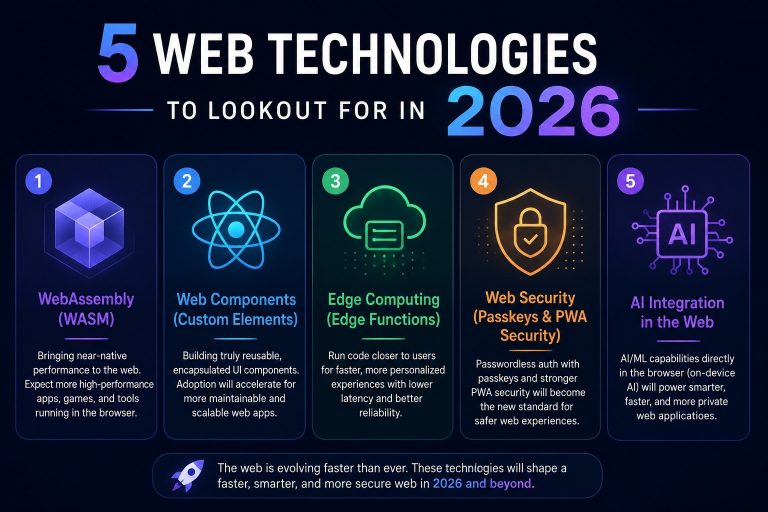
Edge Computing: Edge computing refers to running website code and serving content from servers that are geographically close to the user, rather than from a single centralized server. Traditional hosting sends all requests to one location — which works fine if your users are nearby, but creates lag for everyone else. Edge computing platforms distribute your site’s logic across dozens of locations globally, so a visitor in Dallas and a visitor in London both get fast response times. For websites with national or international audiences, this is a meaningful performance advantage that most pre-2024 sites simply aren’t set up to use.
Questions Also Asked by Other People Answered
How do I know if my website needs to be rebuilt or just updated?
The honest answer is that it depends on how your site was originally built and how well it’s been maintained since. If your site was built on a modern framework (like a recent version of WordPress, Next.js, or similar) and has been regularly updated, incremental improvements may be enough. But if it was built on a legacy CMS, an outdated theme, or a framework that’s no longer actively supported, a rebuild is usually more cost-effective in the long run. The clearest signals that you need a rebuild are: your developer says it’s hard to make changes without breaking other things, your Core Web Vitals scores are consistently poor, or your site can’t be made HTTPS-compliant without significant rework.
Does my website’s age actually affect my Google rankings?
Yes, but not in the way most people assume. Google doesn’t penalize sites simply for being old — in fact, older domains can have strong authority. What affects rankings is performance. Core Web Vitals scores, mobile usability, page load speed, structured data, and HTTPS security are all ranking factors, and older sites frequently struggle on all of them. So the age itself isn’t the issue. The problem is that older sites are usually running on technology that makes it difficult or impossible to meet modern performance standards, and that’s what costs you in search.
Is it really worth rebuilding a website that’s working fine?
“Working fine” is doing a lot of heavy lifting in that question. If by working fine you mean it loads, displays, and accepts form submissions — yes, technically it works. But if your bounce rate is high, your mobile traffic converts poorly, your search rankings have been declining, or your competitors are outperforming you in visibility, then something isn’t working fine. The website is just not failing loudly. A quiet underperformer is still an underperformer, and the compounding cost of lost traffic and conversions often exceeds the cost of a rebuild within a year or two.
What’s the most important thing to fix first on an outdated website?
Security, without question. An outdated encryption protocol or unpatched vulnerability puts your users’ data at risk, and that’s not a problem you want to address after the fact. After security, performance is the priority — specifically, the issues that affect your Core Web Vitals scores, since those directly impact your search visibility. After that, mobile experience and accessibility are the areas with the most user-facing impact. Content and design come last, because even beautifully updated content won’t perform well if the technical foundation is slow and insecure.
How much does it cost to rebuild a website in 2025?
It varies enormously depending on the scope, complexity, and who you hire. A simple professional website can be rebuilt for anywhere from $2,500 to $10,000 with a freelance developer or small agency. A more complex site with e-commerce, custom integrations, or large amounts of content might run $15,000 to $50,000 or more. That said, the better question is: what is it costing you not to rebuild? If your site is underperforming in search and conversion, the revenue you’re leaving on the table over 12 to 24 months often dwarfs the cost of a modern rebuild. Get a performance audit first — many agencies offer them free — before deciding what level of investment makes sense.
Summary
If your website was built before 2024, it’s not automatically broken — but it’s almost certainly falling behind. Web technology moves on an 18-month cycle, and the performance, security, and search standards your site was built against have already been replaced by more demanding ones. The result is a quiet but real gap: slower load times, lower search rankings, weaker mobile experience, and security vulnerabilities that put your users at risk.
The good news is that this is fixable. Start with an honest assessment using free tools like Google Search Console and PageSpeed Insights. If your site is relatively recent and well-built, incremental updates may close the gap. If it’s older or architecturally limited, a full rebuild using modern tools is usually the smarter long-term investment.
Your website is your most accessible, always-on business asset. It works for you around the clock. Giving it the attention it needs isn’t a luxury — it’s how you stay visible, competitive, and trustworthy in a market that keeps raising its standards. The businesses that understand this early are the ones that keep showing up at the top of search results while everyone else wonders what happened.
#WebDevelopment
#WebsitePerformance
#SEOTips
#DigitalPresence
#TechForBusiness