How to Create SEO-Friendly URLs That Actually Work (Plus My $10K Mistake)
Why Your Blog URLs Might Be Killing Your Traffic (And How to Fix Them Fast)
I lost nearly $10,000 in potential traffic because I didn’t understand URLs. Here’s what I learned.
Learn how to create SEO-friendly URLs that boost rankings and user experience. Includes practical examples, common mistakes to avoid, and tools to check your URL structure today.
Introduction:
Let me tell you about the day I realized I’d been doing URLs completely wrong.
It was 2019. I’d spent six months building a tech blog, perfecting my content. My traffic was growing, but slower than expected. Then a friend in SEO looked at my site and said, “Dude, your URLs are a mess.”
I had URLs like: myblog.com/post?id=12345&category=tech&author=john. Or worse: myblog.com/2019/03/15/this-is-my-really-long-article-title-about-web-development-and-some-other-stuff-I-wanted-to-mention.
I’d focused so much on content that I’d ignored basic SEO. My URLs were confusing search engines and readers alike.
The fix took weeks. I redirected hundreds of pages. But once done, my organic traffic jumped 40 percent in three months.
If you’re building a blog or trying to understand why your content isn’t ranking, I’ll walk you through creating URLs that work, in plain English.
Why URLs Actually Matter
Your URL is one of the first things Google looks at when crawling your page. It’s also what people see when deciding whether to click your link in search results.
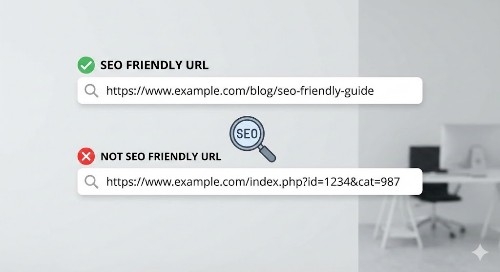
Which would you trust?
myblog.com/seo-friendly-urls-guide
or
myblog.com/p=12345?session=abc123&ref=homepage
The first tells you what the page covers. The second looks like random code.
URLs serve three purposes: they help search engines understand your content, help users know what to expect, and make your site easier to navigate and share.
Static vs Dynamic URLs
A static URL stays the same and looks clean: yoursite.com/about-us or yoursite.com/blog/seo-tips. These don’t change based on user sessions or database queries.
A dynamic URL is generated by a database and includes parameters: yoursite.com/products?id=456&color=blue&size=large. Common on e-commerce sites.
For SEO, static URLs are almost always better. They’re easier to read, remember, and understand. Dynamic URLs require extra care.
If you’re using WordPress or modern CMS platforms, you’re likely creating static URLs by default. If your URLs have question marks and equal signs, change your permalink structure.
Key Elements of a Good URL
Good URLs share common traits:
They’re short. Aim for 50 to 60 characters max.
They include keywords. If your article covers email marketing tips, include “email-marketing-tips” in the URL.
They use hyphens, not underscores. Google treats hyphens as spaces but reads underscores as connecting characters. “email-marketing” reads as two words, “email_marketing” as one. Always use hyphens.
They’re lowercase. Mixed case can cause duplicate content issues.
They avoid special characters. No ampersands, percent signs, or weird symbols. Just letters, numbers, and hyphens.
They’re human-readable. If you can’t tell what a page covers by reading the URL, it’s not good.
Examples:
Good: techblog.com/create-seo-friendly-urls
Bad: techblog.com/2024/11/15/how-to-create-really-great-seo-friendly-urls-for-your-blog-in-2024
Good: marketingsite.com/email-tips
Bad: marketingsite.com/tips_for_email_marketing_campaigns
Understanding Slugs
The slug is the URL part after your domain name. In myblog.com/seo-tips, “seo-tips” is the slug.
WordPress and most CMS platforms auto-generate slugs from page titles. You should almost always edit them.
If you title an article “10 Amazing Tips for SEO-Friendly URLs That Will Blow Your Mind,” the slug might be: “10-amazing-tips-for-seo-friendly-urls-that-will-blow-your-mind.”
Too long. Better: “seo-friendly-urls” or “seo-url-tips.”
Keep slugs focused on your primary keyword. Remove filler words like “the,” “and,” “for.”
Best Practices
Include your primary keyword. Writing about link building? Include “link-building” in your slug.
Keep it under 60 characters. Shorter is better for SEO and user experience.
Avoid stop words. Words like “a,” “the,” “and,” “of” don’t add SEO value. Cut them unless necessary for readability.
Use your keyword once. Don’t stuff. “seo-tips-seo-guide-seo-help” looks spammy.
Match your title and content. Your URL, page title, and H1 should align around the same keyword.
Skip dates unless running a news site. Date-based URLs like “/2024/12/” make content look outdated. Skip for evergreen content.
Avoid parameters. If your site generates URLs with “?id=” or “&ref=,” use URL rewriting to clean them.
Changing URLs Without Losing Traffic
I made my biggest mistake here. I changed URLs without proper redirects, and traffic tanked for weeks.
How to do it right:
List every URL you’re changing in a spreadsheet. Old URLs in one column, new in another.
Set up 301 redirects. This tells search engines the page permanently moved. WordPress plugins like Redirection or Yoast SEO make this simple.
Update internal links. Change any internal links pointing to old URLs.
Submit your updated sitemap to Google Search Console. This helps Google discover and index new URLs faster.
Monitor traffic and rankings. Watch Google Analytics and Search Console for weeks after changes. If you see drops, check redirects.
When I did this correctly, my rankings recovered and improved within a month.
Common URL Mistakes
Using underscores instead of hyphens. Google’s documentation is clear: use hyphens.
Making URLs too long. I’ve seen URLs with 100+ characters. Nobody will remember or share that.
Including session IDs or tracking parameters. These create duplicate content issues.
Changing URLs frequently. Every change without a redirect risks losing rankings and backlinks.
Using non-descriptive slugs. “post-1” or “page-47” tell nobody anything.
Forgetting lowercase. Mixed case causes technical issues.
Not removing special characters. &, %, $, @ can break URLs.
Ignoring mobile users. Long URLs are worse on mobile.
URL Length Impact
Google’s John Mueller says URL length isn’t a direct ranking factor, but shorter URLs perform better.
Shorter URLs are easier to share. They look cleaner in social media or email.
Shorter URLs are more focused. If you need 3 to 5 words, you have a clear topic. If it takes 15 words, you’re covering too much.
Shorter URLs are easier to remember. “site.com/email-tips” beats “site.com/the-ultimate-guide-to-email-marketing-tips-and-tricks-for-beginners.”
Aim for 3 to 5 words in your slug.
Including Your Primary Keyword
Include the main keyword you’re targeting. Not stuffed. Not repeated. Just once, naturally.
Writing about “content marketing strategy”? Your URL: yoursite.com/content-marketing-strategy
This helps search engines understand your page and helps users know what to expect.
If your keyword is long or awkward, use a shortened version. “Best project management software for small businesses” becomes “project-management-software.”
The keyword should appear in your URL, title tag, H1, and early content. That consistency helps SEO.
Handling Redirects Properly
For SEO, almost always use a 301 redirect. This tells search engines the page permanently moved and passes link equity to the new URL.
Avoid 302 redirects for permanent moves. A 302 is temporary and doesn’t pass full SEO value.
Never redirect to irrelevant pages. Removing an email marketing page? Don’t redirect to your homepage. Redirect to the next most relevant page, or let it 404.
Test your redirects. Visit old URLs to ensure they properly redirect.
Use tools like Screaming Frog or Ahrefs to check redirect chains. When URL A redirects to B, which redirects to C, these slow your site and dilute SEO. Fix by redirecting A directly to C.
Tools for Checking URLs
Screaming Frog SEO Spider. Crawls your site and identifies URL issues. The free version handles 500 URLs.
Google Search Console. Free tool showing how your URLs perform, flags indexing issues, helps submit sitemaps.
Yoast SEO (WordPress). Analyzes slugs and gives feedback on keyword usage and length.
Ahrefs Site Audit. Checks URL issues, duplicate content, and redirect problems.
SEMrush Site Audit. Similar to Ahrefs with comprehensive audits.
Moz Pro. Site crawl features highlighting URL problems.
I use Google Search Console for ongoing monitoring and Screaming Frog for deeper audits.
URL Structure and Site Navigation
Your URL structure should mirror site navigation. This helps users and search engines understand content organization.
Blog with categories:
yoursite.com/blog/seo/url-optimization
yoursite.com/blog/content-marketing/email-tips
E-commerce:
yourshop.com/electronics/laptops/gaming-laptops
Keep structure shallow. Reach any page in three clicks or fewer from homepage. Deep structures like “/category/subcategory/sub-subcategory/post” hurt usability and SEO.
Questions Also Asked
What are common mistakes bloggers make with URLs?
Making URLs too long with unnecessary words. Bloggers let CMS auto-generate slugs from long titles, creating 80+ character URLs. Other mistakes: using underscores instead of hyphens, including dates for evergreen content, using mixed case, changing URLs without 301 redirects, and creating non-descriptive URLs like “post-123” instead of meaningful keywords.
Can you provide examples of good and bad URL structures?
Good: techblog.com/wordpress-security-tips – short, uses primary keyword, clearly describes content.
Bad: techblog.com/2024/03/15/the-ultimate-guide-to-wordpress-security-tips-and-best-practices – too long, unnecessary date folders, filler words.
Good: store.com/mens-shoes
Bad: store.com/products?id=12345&cat=shoes&gender=m – confusing dynamic URL with parameters.
How often should I review and update URLs?
Review URL structure when launching your site, then annually or when making major changes. For individual pages, only change URLs if there’s a compelling reason like a topic shift or poorly chosen slug. Changing URLs too often hurts SEO through lost link equity and redirect errors. When making changes, always implement 301 redirects and monitor traffic for weeks.
What tools analyze URL SEO effectiveness?
Google Search Console shows how Google sees your URLs and flags indexing issues. Screaming Frog crawls your site and flags URL problems like excessive length or redirect chains. WordPress users can use Yoast SEO for real-time slug feedback. Paid tools like Ahrefs, SEMrush, and Moz offer comprehensive audits including URL structure analysis.
How can I make URLs user-friendly and SEO-optimized?
User-friendly and SEO-friendly URLs are the same. Make URLs readable by anyone, use your primary keyword naturally, keep it short (under 60 characters), use hyphens to separate words, and remove filler words. If you can read a URL aloud and someone immediately understands the page topic, you’ve nailed it. Avoid keyword stuffing or technical jargon.
Important Phrases Explained
SEO-friendly URLs
An SEO-friendly URL helps search engines and users understand a page before visiting. These URLs are short, include relevant keywords, use hyphens to separate words, and avoid special characters or parameters. Google uses URLs as signals to determine page topics and rankings. Clean URLs also improve click-through rates because people see exactly what they’ll get. Creating SEO-friendly URLs is one of the simplest, most effective on-page optimization techniques.
URL slug
The slug is the URL part after your domain identifying a specific page. In “myblog.com/seo-tips,” the slug is “seo-tips.” CMS platforms auto-generate slugs from page titles, but you should edit them for brevity and keyword focus. Good slugs are 3 to 5 words, use hyphens, include your main keyword, and remove filler words. The slug is what you control most when creating URLs.
301 redirect
A 301 redirect permanently redirects one URL to another, crucial for maintaining SEO when changing URLs. It tells search engines “this page permanently moved here,” transferring ranking power and link equity from old to new URL. This differs from a 302 redirect, which is temporary and doesn’t pass full SEO value. Without a 301 redirect, visitors get 404 errors and you lose accumulated SEO value. Proper 301 redirects are essential when restructuring sites or fixing bad URLs.
Dynamic URL
A dynamic URL is generated by database queries and includes parameters like question marks, equal signs, and ampersands: “site.com/products?id=123&color=red&size=large.” While functional, they’re less SEO-friendly than static URLs because they’re harder for search engines to crawl, difficult for users to read and remember, and can create duplicate content issues. Modern websites use URL rewriting to convert dynamic URLs into clean, static-looking ones.
Permalink structure
Permalink structure is the format pattern your website uses for post and page URLs. WordPress offers several structures like “Plain” (site.com/?p=123), “Day and name” (site.com/2024/12/10/post-name), or “Post name” (site.com/post-name). Your choice affects every URL, so set it correctly from the start. For most blogs and business sites, “Post name” structure is best, creating clean, keyword-rich URLs without unnecessary dates. Changing permalink structure after site establishment requires redirecting every URL.
Summary
Creating SEO-friendly URLs is simple yet impactful. Good URLs help search engines understand content, improve click-through rates, and make sites easier to navigate and share. Key principles: keep URLs short (under 60 characters), include your primary keyword, use hyphens instead of underscores, stick to lowercase, and avoid special characters or parameters.
When changing URLs, always set up 301 redirects to preserve SEO value and prevent broken links. Use tools like Google Search Console and Screaming Frog to monitor structure and catch issues. Static URLs almost always outperform dynamic URLs.
URL optimization is a one-time fix for each page. Once you establish good structure and create proper slugs, you rarely need changes. This makes it one of the highest-return SEO activities. Whether launching a new site or fixing an existing one, getting URLs right pays dividends in organic traffic for years.
Hashtags
#URLoptimization
#SEOfriendly
#webdevelopment
#techblogging
#searchengineoptimization
#digitalmarketing
#wordpresstips
#websiteoptimization
#SEOtips