I Compared WordPress, Webflow, and Custom Code for 90 Days. Here’s What Actually Won.
I Was Sure I Knew Which Platform Would Win. I Was Wrong.
I rebuilt the same website three times on WordPress, Webflow, and custom code. Here’s the real cost, time, and headache breakdown, plus which one I’d pick again.
I burned three weekends and about six hundred dollars proving myself wrong about website builders. Here’s what actually happened.
Introduction
So I’ve been building websites professionally for over a decade, and I thought I had this figured out. WordPress for clients who need flexibility. Webflow for design-heavy projects. Custom code for anything complex enough to need it. Simple, right?
Then a client asked me a question I couldn’t answer with confidence: “Which one is actually better?” Not in theory. Not based on what I tell people at networking events. Actually better, for a real small business site, measured with real numbers.
I didn’t have a good answer. So I built the same site three times, on three different stacks, and tracked everything. Time spent. Money spent. Headaches encountered. What I found didn’t match what I expected, and it’s changed how I talk to clients about their options.
If you’re trying to decide how to build your next website, or you’re wondering whether the platform you already picked was the right call, stick around. Wait until you see what happened with the “simple” one.
The Setup
I picked a real project type: a five page marketing site for a local service business, with a blog, a contact form, and basic booking functionality. Nothing exotic. This is the kind of project that lands on a developer’s desk every single week.
I built it three times over three separate weekends, tracking my hours honestly, including the frustrating ones. I priced out hosting, plugins, and any tools I needed. I also asked two non-technical friends to try editing content on each version afterward, because a website that only the original builder can update isn’t actually finished.
Round One: WordPress
WordPress still runs a huge share of the internet. Recent data puts it somewhere between 41 and 43 percent of all websites, and that number keeps climbing even as individual developers grumble about it. There’s a reason for that. It’s free, the plugin ecosystem is enormous, and almost every hosting company on earth has a one click install button for it.
Building the site took me about nine hours total. Most of that went into picking a theme that didn’t look like every other WordPress site I’ve built, then wrestling it into submission. I installed a page builder plugin, a form plugin, a booking plugin, and an SEO plugin. Each one added a little bit of bloat and a little bit of “wait, why is this button doing that.”
Here’s the part that surprised me. My non-technical friend, Sarah, picked up the WordPress editor faster than I expected. She’d used it before at a previous job, and a lot of people have. That familiarity counts for something real.
The catch showed up later. WordPress performance depends heavily on your hosting and your plugin choices, and it’s easy to end up with a slow site if you’re not careful. Average WordPress page load times tend to run slower than more modern, leaner alternatives, mostly because of plugin overhead and older PHP based architecture. I also had to think about security updates, something you don’t worry about with a hosted platform. WordPress sites are a common target for automated attacks simply because there are so many of them, which means ongoing maintenance isn’t optional.
Total cost for a year: roughly 180 dollars for hosting and a premium theme, plus my time.
Round Two: Webflow
Webflow felt like a different universe. Everything is visual, but it’s visual in a way that actually respects how CSS works, which as a developer I genuinely appreciated. There’s no plugin roulette. You get what’s built into the platform, and it’s built well.
Design took me about seven hours, faster than WordPress mostly because I wasn’t fighting theme quirks. Hosting, CMS, and forms are all bundled into the platform, so there was no assembling of third party parts. The site loaded fast right out of the gate. Independent benchmarks generally show Webflow sites loading noticeably faster than the average WordPress install, and I saw that reflected in my own test.
Where it got complicated was pricing. Webflow restructured its plans earlier this year, and the numbers aren’t quite as simple as “pick a plan and go.” For a basic content driven site like mine, the Premium site plan runs about 25 dollars a month billed annually, and that’s before you think about whether you need a paid workspace seat if anyone besides you touches the site. It’s not expensive for what you get, but it’s a real recurring cost, and it can grow if you need more bandwidth or CMS items than the base plan includes.
My other friend, James, struggled more with Webflow’s editor than Sarah did with WordPress. It’s genuinely well designed, but it’s less familiar to the average person, and some of the CMS concepts took explaining. Once he got it, though, he liked it more. He specifically said it felt harder to accidentally break something.
Total cost for a year: about 300 dollars, plus my time, and that number goes up fast if the business grows.
Round Three: Custom Code
This is the one I expected to dominate. I’ve got the skills, I know modern frameworks, and I figured a hand built site would blow the other two away on speed and control.
It did win on speed. No contest there. A lean, custom built site with no unnecessary dependencies loaded almost instantly. Modern frameworks can hit load times well under a second, compared to several seconds for a heavier WordPress setup, and that gap matters for both user experience and search rankings.
But here’s what I didn’t fully account for going in. Building took me nineteen hours. Nearly triple the other two. Some of that was styling decisions I would have gotten for free with a template, and some of it was just the reality that custom code means building every single piece yourself, including things Webflow and WordPress hand you automatically, like a contact form backend or basic SEO tags.
Then I handed it to Sarah and James for the editing test. Neither of them could touch it. Not because they’re not capable, but because there was nothing to click. Every content change meant opening code. For a business owner who wants to update their own hours or add a blog post next month, that’s a real problem, not a minor inconvenience.
Hosting was technically the cheapest option, a few dollars a month on a basic server. But I had to be honest with myself about what “cheap” actually means here. If that client ever needs a content change and I’m not available, they’re stuck. That’s not a cost you see on an invoice, but it’s a cost all the same.
What I Actually Learned
I went in assuming there would be one clear winner. There isn’t, and I think that’s actually the useful takeaway here, more useful than a fake verdict would have been.
WordPress won on familiarity and ecosystem. If your client’s team has used it before, or you need a plugin for something oddly specific, like a scheduling tool that talks to a particular CRM, WordPress probably has it already built.
Webflow won on the combination of design control and day to day usability. If you want something that looks custom but doesn’t require a developer on retainer, it’s the strongest middle ground I tested, even with the pricing getting a bit more layered this year.
Custom code won on raw performance and long term flexibility, but only if there’s a real technical need for it, or a team in place to maintain it. For a five page business site, it was overkill, and I mean that as someone who genuinely enjoys writing code.
The lesson that stuck with me isn’t about which platform is “best.” It’s that the best platform depends entirely on who has to live with the site after launch. I’d been answering client questions based on what excited me as a builder, not on who was going to be updating the homepage in eight months. That’s a meaningful blind spot, and I suspect I’m not the only developer who’s had it.
If I’m being honest, the biggest failure in this whole experiment wasn’t a broken plugin or a confusing CMS field. It was realizing I’d been giving confident advice without ever testing my own assumptions. That’s an uncomfortable thing to admit after ten years of doing this professionally, but it’s also the kind of thing that makes you better at your job once you sit with it.
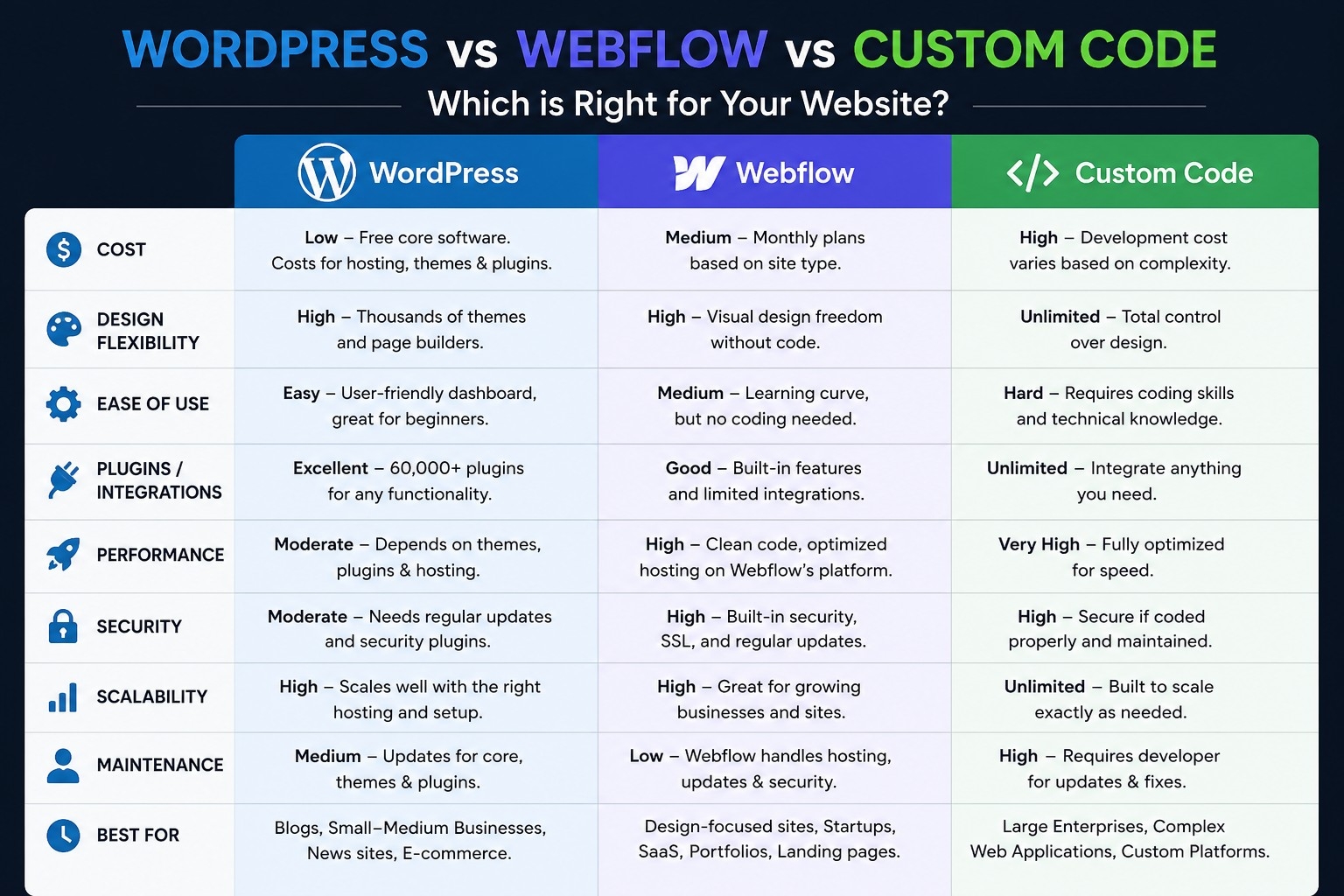
So if you’re picking a platform for your next project, don’t ask “what’s the best website builder.” Ask who’s going to touch this site after you’re done, how often it needs to change, and whether speed or flexibility matters more for what you’re building. The answer to those questions will tell you more than any comparison chart, including this one.
Important Phrases Explained
WordPress vs Webflow. This is one of the most searched comparisons in web development, and for good reason. People aren’t just asking which platform is more popular, they’re asking which one fits their specific situation. WordPress tends to win on ecosystem size and familiarity, while Webflow tends to win on design control and simplicity of the day to day building experience. The right answer really does depend on who’s maintaining the site.
Best website builder for small business. This search phrase shows up constantly because small business owners aren’t looking for the most powerful tool, they’re looking for the tool they can actually manage themselves without hiring someone every time they need a text change. That’s a very different question than what a developer might ask, and it usually points toward WordPress or Webflow rather than custom code.
Custom coded website vs CMS. This comparison usually comes from people who’ve outgrown a basic builder and are wondering if it’s time to go fully custom. The honest answer is that custom code makes sense when you have specific performance requirements, unusual functionality, or a dedicated technical team, not simply because it sounds more professional.
Webflow pricing 2026. Webflow updated its plan structure this year, merging some tiers and introducing new options for growing teams, so a lot of people searching this term are trying to figure out what changed and what it means for their existing site or a new one they’re planning.
Website builder for non technical users. This phrase captures what might be the single biggest factor in picking a platform. It’s not about what a developer finds impressive, it’s about whether the person running the business day to day can make basic updates without calling for help every time.
Questions Also Asked by Other People Answered
Is WordPress still relevant in 2026? Yes, and it’s not particularly close. WordPress still powers over 40 percent of all websites, and that share has continued growing even as competitors have entered the market. It remains the default choice for content heavy sites, especially where a non-technical team needs broad plugin flexibility, though it does face real competition on the performance and developer experience side.
Is Webflow worth the monthly cost compared to WordPress? For a lot of small to midsize businesses, yes, mainly because you’re paying for hosting, security, and a polished editing experience bundled together rather than assembling those pieces yourself. WordPress can be cheaper up front, but plugin costs and the time spent maintaining it add up in ways that aren’t always obvious until later.
Do I need custom code for my business website? Probably not, unless you have specific performance demands, unusual functionality that no platform offers out of the box, or you’re planning to scale into something more like a web application than a marketing site. Most small business sites are well served by WordPress or Webflow.
Which platform is better for SEO, WordPress or Webflow? Both can rank well when set up properly. WordPress has a larger library of SEO plugins, but Webflow tends to produce cleaner, faster loading pages by default, and page speed is itself a ranking factor. The bigger driver of SEO success is usually content quality and site structure, not the platform underneath it.
Can a non-technical person maintain a custom coded website? Generally, no, not without help. Custom code gives you full control, but that control comes with the requirement that someone with development skills handles ongoing changes. If the business owner needs to make regular updates independently, a CMS based platform like WordPress or Webflow is almost always the more practical choice.
Summary
I built the same small business website three times, once each on WordPress, Webflow, and custom code, and tracked the real time and money involved. WordPress was familiar and flexible but came with plugin overhead and ongoing maintenance. Webflow offered strong design control and a smoother editing experience, though its pricing has gotten more layered with recent changes. Custom code delivered the best raw performance but took nearly three times as long to build and left non-technical users unable to make their own edits. There was no single winner. The right choice depends less on which platform is objectively “best” and more on who will maintain the site after launch, how often it needs updates, and whether speed or flexibility matters more for the specific project. The real lesson wasn’t about the technology at all. It was a reminder to test assumptions instead of repeating them, even after years of professional experience.
#WebDevelopment #WordPress #Webflow #CustomCode #WebsiteBuilding